angular笔记
本文最后更新于:2023年6月15日 下午
Angular 学习
1.组件
angular中 一个组件由三个文件组成
.html、.ts、.css
ts文件中
- Selector
:’app-my01’表示组件到名称,使用的时候
- templateUrl 组件关联的html地址
- styleUrl 组件所关联使用的css文件地址
- Export class 组件的类名
- Selector
:’app-my01’表示组件到名称,使用的时候
组件制作完毕之后,必须注册到全局中才能使用
- app.module.ts 中 declearations
- 在根组件html中使用组件
快速制作组件
- ng generate component 组件名称
- 缩写 ng g c 组件名称
- 自动更新到全局module中
同一组件中数据和属性的绑定
- 在 ts脚本文件的 类中书写
1
2
3
4
5
6
7
8
9
export class My01Component implements OnInit {
constructor() { }
name ='01'
age = 18
married = false
ngOnInit(): void { }
花括号的使用
1
2
3
4
5
6<h1>hello world my </h1>
<p>
<li>{{name}}</li>
<li>{{age}}</li>
<li>{{married}}</li>
</p>
括号中支持
数学运算符 加减乘除、取余
比较运算符 大于小于等于不等于。。。
三元运算符 age > 30 ? “中年”:青年
逻辑运算符
逻辑与&&
逻辑或 ||
逻辑非 !
对象方法
1
{{"hello".toUpperCase()}}- 类中的方法
1
2
3
4
5
6
// html
<h3>可以调用方法{{getVal()}}</h3
// ts
public getVal():any{
return 65535;
}- 局部变量
1
2
<input #heroInput>
<p>{{heroInput.value}}</p>- 点击事件
1
2
3
4
//在 ts文件的类中写方法
showClick(){
alert('触发了点击事件')
}1
2
3
4
5<!--在html中插入button按钮并且注册事件-->
<ul>
<li>
<button (click)="showClick()">点击事件</button></li>
</ul>其他一些知识点
- 属性的绑定
1
2
3
4<!--在ts类中注册了 name="朱凌一" -->
<h1 title = "朱凌一">本阶段学习的学生</h1>
<h1 [title]="name">本阶段学习的学生</h1>
<!-- ts // name = “朱凌一” -->- 特殊属性 HTML绑定
1
2
3
4
5
6<ul>
<div>{{html}}</div>
<!-- //等价于 原生DOM中的 innerHTML 里面的内容会被当作纯文本 -->
<div [innerHtml]="html"></div>
<!-- //数据被解析了 -->
</ul>双向数据绑定
angular 默认不支持双向数据绑定
- 在 全局配置文件 app.module.ts中进行引入
1
import { FormsModule } from '@angular/forms';1
2
3
4
5
6//注入Forms模块
imports: [
BrowserModule,
AppRoutingModule,
FormsModule
],1
2
3
4
5<ul>
<input type="text" [(ngModel)]="name">
<!--对name属性进行双向绑定 []-->
<div>{{name}}</div>
</ul>
样式属性 class与style的使用
动态样式 ngStyle
1
2
3
4<ul>
<li [ngStyle]="{color:'red','font-size':size}">{{size}}</li>
<li [ngStyle]="{color:'red',fontSize:size}">{{size}}</li>
</ul>对象类型属性名不能含有中划线
- 小驼峰命名法或者用字符串包裹起来
html不支持++、+=等复合运算符
1
2
3<button (click)="size=size+1" [ngClass]="{danger:true}">变大</button>
<button (click)="size=size+1" [ngClass]="{danger:size>20}">变大</button>
<button (click)="size=size+1" [ngClass]="{success:size>=30}">变大</button>1
2
3
4
5
6
7
8
9
10
11
12
13
14
15
16
17
18.css 文件中
h1{
color: red;
}
.danger{
color:white;
background-color: red;
border-radius:3px;
padding: 10px;
}
.success{
color:white;
background-color: green;
border-radius:3px;
padding: 10px;
}
常用指令
条件指令
if指令
1
2*ngif="expression"
<div *ngIf="score<=90">良好</div>if-else指令
1
2
3
4
5
6
7<ng-container *ngIf="score>=100; else elseTemplate">
<b>及格</b>
</ng-container>
<ng-template #elseTemplate>
<b>不及格</b>
</ng-template>
<!-- elseTemplate 标记else方法执行的跳转位置 -->switch指令
1
2
3
4
5
6
7<span [ngSwitch]="type">
<!-- ngSwitch 变量值 -->
<p *ngSwitchCase="1"> 普通会员</p>
<p *ngSwitchCase="2"> 黄金会员</p>
<p *ngSwitchCase="3"> 钻石会员</p>
<p *ngSwitchDefault>啥也不是</p>
</span>
循环指令
for 循环
1
2
3
4*ngFor = "let item of items"
<ul>
<li *ngFor="let item of names">{{item}}</li>
</ul>带有序号的for循环
1
2
3
4
5
6
7<!-- i 元素在数组中的序号 -->
<ul>
<li *ngFor="let item of names; let i=index">
<b>{{i}}.</b>
<span>{{item}}</span>
</li>
</ul>
自定义指令
1
2
3
4
5
6<div>
<!-- 自定义指令: ng generate directive 指令名 -->
<!-- 简化写法 ng g d 指令名 -->
<!-- eg: 自定义指令 appfocus 让输入框自动获取焦点 -->
<input type="text" appFocus value="123">
</div>1
2//使得 input标签获得焦点
import { Directive, ElementRef } from '@angular/core';
1
2
3
4
5
6
7
8
9
10
11
12
13
14
15
16
17
18
19
20
21
22
23
24
25
26
27
28@Directive({
selector: '[appFocus]'
})
export class FocusDirective {
//生成新的指令必须重启服务器,否则不生效
constructor(e:ElementRef) {
console.log(e)
let input = e.nativeElement //用指令绑定标签
input.focus() //通过指令使得标签获得了 nativeElement.foucs的原生功能
}
}
//使得 input标签中的值变为大写
import { Directive, ElementRef } from '@angular/core';
@Directive({
selector: '[appUpper]'
})
export class UpperDirective {
constructor(e:ElementRef) {
console.log(e)
e.nativeElement.value = e.nativeElement.value.toUpperCase()
}
}
//e.nativeElement 当前标签 如 input
过滤器、管道(pipe)
常常用来格式化数据
1.常用的系统管道
1
2
3
4
5
6
7
8
9
10
11
12
13
14
15
16
17
18
19
20<ul>
<li>大写:{{'hello'|uppercase}}</li>
<li>小写:{{'WORLD'|lowercase}}</li>
<li>首字母大写{{'my name is xx'|titlecase}}</li>
<li>百分数:{{0.33|percent}}</li>
<li>百分数小数位:{{0.565656|percent:'2.2'}}</li>
<!-- 整数位两位,小数位两位 56.56% 不足要求的位数会用0补全-->
<li>钱:{{123456.789|currency}}</li>
<!-- 自带四舍五入,带千进位 -->
<li>钱:{{123456.789|currency:'¥'}}</li>
<!-- 日期格式 -->
<!-- 时间戳需要ts中文件支持 距离1970年1月1日的秒数 -->
<li>时间戳:{{time}}</li>
<!-- 转化为日期格式 -->
<li>日期格式:{{time|date}}</li>
<!-- 通过参数定制日期格式 -->
<!-- 年y 月M(大M) 日d 小时h 分钟m 秒s -->
<li>日期:{{time|date:'yyyy-MM-dd HH:mm:ss'}}</li>
<li>日期:{{time|date:'yyyy-M-d hh:mm:ss'}}</li>
</ul>
2.自定义管道
1
2
3
4
5
6
7
8
9
10
11
12
13
14
15
16
17
18
19
20
21
22
23
24
25
26
27//ng g p gender 生成管道文件
import { Pipe, PipeTransform } from '@angular/core';
@Pipe({
name: 'gender'
})
export class GenderPipe implements PipeTransform {
// transform(value: unknown, ...args: unknown[]): unknown {
// return null;
// }
// 管道生成之后必须重启
// 固定的管道写法问题{{value|管道名}}
//value值 会固定传递到下方transform方法的参数中
// 返回值就会作为管道的处理结果
transform(value:any,lang='zh') {
console.log(value)
if(lang=='zh'){
if(value==0) return '男';
if(value==1) return '女';
}
if(lang=='en'){
if(value==0) return 'male';
if(value==1) return 'female';
}
return
}
}1
2
3
4
5
6
7
8
9
10
11
12
13
14
15
16
17
18
19
20
21<!-- 自定义管道-->
<table border="1">
<tr>
<td>序号</td>
<td>姓名</td>
<td>年龄</td>
<td>性别</td>
<td>性别:en</td>
</tr>
<tr *ngFor="let item of emps;let i = index">
<td>{{'序号:'+(i+1)}}</td>
<td>{{item.name}}</td>
<td>{{item.age}}</td>
<!-- 制作gender性别 pipe管道 -->
<!-- 生成自定义管道 ng g p -->
<!-- 管道的可选、非可选参数声明 -->
<td>{{item.sex|gender}} </td>
<td>{{item.sex|gender:"en"}} </td>
</tr>
</table>
组件的生命周期
定义:一个组件从生成到出现,然后最终销毁的过程 就是组件的生命周期
生命周期的每个阶段都会触发对应的函数,利用这些函数可以在不同周期完成对应的任务
constructor()
1
2
3
4//面向对象中类的构造方法
constructor(){
console.log("组件出生的第一时间触发")
}ngOnDestroy()
1
2
3ngOnDestroy():void{
console.log('组件销毁时触发')
}ngOnInit()
1
2
3ngOnOInit():void{
console.log("组件中的内容开始初始化") //类似vue中mounted
}总览
1
2
3
4
5
6
7
8
9
10
11
12
13
14
15
16
17
18
19
20
21
22
23
24
25
26
27
28
29
30
31
32
33
34
35
36
37
38constructor() {
//组件的构造函数 第一个执行的
console.log('My02Component进行constructor完成')
}
show02 = true
ngOnInit(): void {
console.log('Init执行完成')
//常常在这个方法中发送一些网络请求
}
ngAfterContentInit(): void {
//Called after ngOnInit when the component's or directive's content has been initialized.
//Add 'implements AfterContentInit' to the class.
console.log('组件中的数据初始化完毕时候触发');
}
ngAfterViewInit(): void {
//Called after ngAfterContentInit when the component's view has been initialized. Applies to components only.
//Add 'implements AfterViewInit' to the class.
console.log("组件上的UI,显示的时候用户的界面初始化完成时候的时候触发");
}
ngAfterContentChecked(): void {
//Called after every check of the component's or directive's content.
//Add 'implements AfterContentChecked' to the class.
console.log("专门用来监听组件上的数据发生变化,数据发生变化的时候触发");
}
ngAfterViewChecked(): void {
//Called after every check of the component's view. Applies to components only.
//Add 'implements AfterViewChecked' to the class.
console.log("组件上的UI随着数据更新而变化时候触发");
}
ngOnDestroy(): void {
//Called once, before the instance is destroyed.
//Add 'implements OnDestroy' to the class.
console.log('OnDestroy组件销毁完成')
//组件销毁的时候做一些清理工作
}
2.组件通信
父元素与子元素
1
2
3<!-- 给要掌控的子元素组件一个唯一标识 类似 id='xxx' -->
<!-- 与语法糖 #代替了 id -->
<app-my03 #my03></app-my03>1
2
3
4
5
6
7@ViewChild('my03')my03!:My03Component
change(){
console.log(this.my03)
this.my03.age +=10
this.my03.show()
}
父子传参
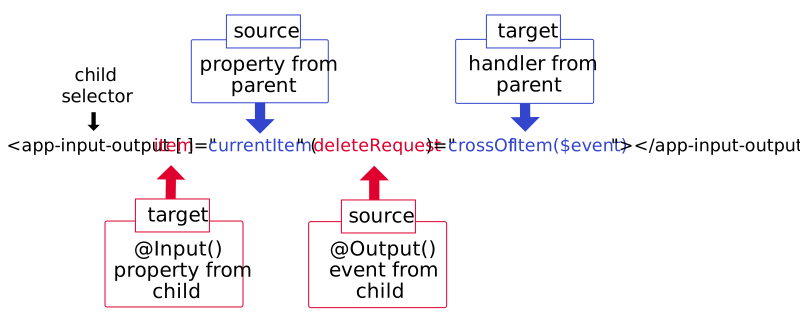
父组件传值给子组件
- 父组件可以直接访问子组件中的public变量
- 父组件中声明子组件
1
2
3
4
5
6<!--父组件的html文件,引入子组件 设置父组件ts中ViewChild的属性(索引):#child-->
<p>father works!</p>
<app-child #child [childReceivefatherMsg]="fatherMsg" [childUseFatherRun]="fatherRun"></app-child>
<!--子中:childReceivefatherMsg属性,绑定接受父组件中fatherMsg属性-->
<!--子中:childUseFatherRun,绑定调用父组件中childUseFatherRun方法-->
<button (click)="fatherUseChild()">调用子组件属性</button>1
2
3
4
5
6
7
8
9
10
11
12
13
14
15
16
17
18
19
20
21
22
23
24
25
26
27
28
29//父组件的TS文件
import { Component, OnInit, ViewChild } from '@angular/core';
@Component({
selector: 'app-father',
templateUrl: './father.component.html',
styleUrls: ['./father.component.css']
})
export class FatherComponent implements OnInit {
@ViewChild('child') child: any //获取对应的子组件,赋值给child变量
public fatherMsg: string = '这是父组件中的信息'
constructor() { }
fatherRun() {
console.log("父组件正在跑")
}
fatherUseChild() {
//父组件调用子组件的方法
console.log(this.child.childMsg)
}
ngOnInit(): void {
}
}- 子组件中声明接受与调用的变量
1
2
3
4
5
6
7export class My04Component implements OnInit {
constructor() { }
@Input() name!:string //核心 利用@Input 获取父组件中指定的name属性,作为自己一个属性
ngOnInit(): void {
}
}1
2
3<!--子组件的html中-->
<p>child works!</p>
<button (click)="clildRunsFather()">子组件调用父组件</button>1
2
3
4
5
6
7
8
9
10
11
12
13
14
15
16
17
18
19
20
21
22
23
24
25
26
27
28
29
30//子组件的TS文件中
import { Component, Input, OnInit } from '@angular/core';
@Component({
selector: 'app-child',
templateUrl: './child.component.html',
styleUrls: ['./child.component.css']
})
export class ChildComponent implements OnInit {
@Input()
public childReceivefatherMsg: string | undefined
@Input()
public childUseFatherRun: any
public childMsg: string = '这是子组件中的属性信息'
constructor() { }
ngOnInit(): void {
}
clildRunsFather() {
console.log(this.childReceivefatherMsg)
this.childUseFatherRun()
}
}子元素传值给父元素
1
2
3<1--父组件></1-->
<!--父组件中安排一个间谍-->
<app-my05 (msgEvent)="show($event)"></app-my05>1
2
3
4
5//父组件中设置show方法
show(msg:string){
console.log('msg:',msg)
this.pMsg = msg
}1
2
3<button (click)="msgEvent.emit('东东')">东东</button>
<button (click)="msgEvent.emit('亮亮')">亮亮</button>
<button (click)="msgEvent.emit('然然')">然然</button>1
2
3
4
5
6
7//子组件中注册间谍事件并声明Output传参
export class My05Component implements OnInit {
@Output()msgEvent = new EventEmitter()
constructor() { }
ngOnInit(): void {
}
}- (根)核型组件中的设置
1
2<!--根组件中-->
<app-father></app-father>
- (根)核型组件中的设置
服务
angular中利用服务实现状态管理,在组件之间共享数据
1
2
3
4
5
6
7
8
9
10
11// ng g s name 生成名为name的服务,类为NameService
import { Injectable } from '@angular/core';
@Injectable({
providedIn: 'root'
})
export class NameService {
//nameS下的names属性 nameS.names
names =['亮亮','然呢','东东']
constructor() { }
}
1
2
3
4
5
6
7
8
9
10
11
12
13
14
15
16
17
18
19
20
21
22
23
24
25
26
27
28
29
30//在组件ts文件中 注册服务
export class My06Component implements OnInit {
//声明属性 来保存传入的服务
//只有属性才能在html中使用 :类型给VScode看,能够解析
nameS:NameService
//声明依赖 要想初始化当前组件必须传入一个 NameService类型的变量
//变量名是自定义的,最好需要有一定的含义
constructor(nameS:NameService) {
this.nameS = nameS
}
ngOnInit(): void {
}
}
//语法糖写法
export class My06Component implements OnInit {
//声明属性 来保存传入的服务
//只有属性才能在html中使用 :类型给VScode看,能够解析
//声明依赖 要想初始化当前组件必须传入一个 NameService类型的变量
//变量名是自定义的,最好需要有一定的含义
constructor(public nameS:NameService) { //加上public
this.nameS = nameS
}
ngOnInit(): void {
}
}
4.网络请求
1
2
3
4// Angular 中自带 HttpClient模块
import {HttpClientModule} from '@angular/common/http' //加载网络模块
//下方imports中
imports:[HttpClientModule]
1
2
3
4
5
6
7
8
9
10
11
12
13
14
15
16
17
18
19
20
21
22
23
24
25res!:Result
constructor(public http:HttpClient) {
let url = "http://localhost:8082/server"
let body = 'pn0=1'
let options ={
headers: new HttpHeaders({
//内容类型: 代表参数格式是字符串类型
'content-type':'application/x-www-form-urlencoded'
})
}
// @ts-ignore
this.http.get(url).subscribe((res:Result)=>{
console.log(res.name)
this.res = res
})
}
ngOnInit(): void {
}
}
interface Result{
name:string;
age:number
}