NeRF-pytorch源码注释

本文最后更新于:2023年5月6日 下午

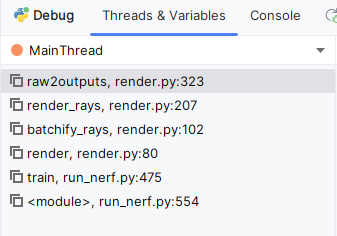
主要函数调用栈

NeRF-pytorch函数调用栈

fern.txt

配置文件

1
2
3
4
5
6
7
8
9
10
11
12
13
14
15
expname = fern_test
basedir = ./logs
datadir = ../NeRF_data/llff/fern
dataset_type = llff

factor = 8
llffhold = 8

N_rand = 1024
N_coarse_samples = 64
N_fine_samples = 64

use_viewdirs = True
raw_noise_std = 1e0

run_nerf.py

主函数,内部集成了Train训练函数

train: 训练的主函数

create_log_files: 创建log文件

create_nerf: 按论文的结构构造神经网络

run_network: 位置编码完送,调用batchify

batchify: 把光线分批,再调用神经网络,再拼起来

run_render_only: 只进行渲染

1
2
3
4
5
6
7
8
9
10
11
12
13
14
15
16
17
18
19
20
21
22
23
24
25
26
27
28
29
30
31
32
33
34
35
36
37
38
39
40
41
42
43
44
45
46
47
48
49
50
51
52
53
54
55
56
57
58
59
60
61
62
63
64
65
66
67
68
69
70
71
72
73
74
75
76
77
78
79
80
81
82
83
84
85
86
87
88
89
90
91
92
93
94
95
96
97
98
99
100
101
102
103
104
105
106
107
108
109
110
111
112
113
114
115
116
117
118
119
120
121
122
123
124
125
126
127
128
129
130
131
132
133
134
135
136
137
138
139
140
141
142
143
144
145
146
147
148
149
150
151
152
153
154
155
156
157
158
159
160
161
162
163
164
165
166
167
168
169
170
171
172
173
174
175
176
177
178
179
180
181
182
183
184
185
186
187
188
189
190
191
192
193
194
195
196
197
198
199
200
201
202
203
204
205
206
207
208
209
210
211
212
213
214
215
216
217
218
219
220
221
222
223
224
225
226
227
228
229
230
231
232
233
234
235
236
237
238
239
240
241
242
243
244
245
246
247
248
249
250
251
252
253
254
255
256
257
258
259
260
261
262
263
264
265
266
267
268
269
270
271
272
273
274
275
276
277
278
279
280
281
282
283
284
285
286
287
288
289
290
291
292
293
294
295
296
297
298
299
300
301
302
303
304
305
306
307
308
309
310
311
312
313
314
315
316
317
318
319
320
321
322
323
324
325
326
327
328
329
330
331
332
333
334
335
336
337
338
339
340
341
342
343
344
345
346
347
348
349
350
351
352
353
354
355
356
357
358
359
360
361
362
363
364
365
366
367
368
369
370
371
372
373
374
375
376
377
378
379
380
381
382
383
384
385
386
387
388
389
390
391
392
393
394
395
396
397
398
399
400
401
402
403
404
405
406
407
408
409
410
411
412
413
414
415
416
417
418
419
420
421
422
423
424
425
426
427
428
429
430
431
432
433
434
435
436
437
438
439
440
441
442
443
444
445
446
447
448
449
450
451
452
453
454
455
456
457
458
459
460
461
462
463
464
465
466
467
468
469
470
471
472
473
474
475
476
477
478
479
480
481
482
483
484
485
486
487
488
489
490
491
492
493
494
495
496
497
498
499
500
501
502
503
504
505
506
507
508
509
510
511
512
513
514
515
516
517
518
519
520
521
522
523
524
525
526
527
528
529
530
531
532
533
534
535
536
537
538
539
540
541
import os
import imageio
import time
import torch
import numpy as np
from tqdm import tqdm,trange
from opts import config_parser

from load_llff_data import load_llff_data

from embed import get_embedder
from NeRF_model import NeRF
from render import render,render_path,to8b
from rays import get_rays_np
#定义训练用的device
device = torch.device("cuda" if torch.cuda.is_available() else "cpu")

#定义计算loss误差的函数
img2mse = lambda x, y: torch.mean((x - y) ** 2)
#定义由mse计算psnr的函数
mse2psnr = lambda x: -10. * torch.log(x) / torch.log(torch.Tensor([10.]))

def run_render_only(args,images,i_test,basedir,expname,render_poses,hwf,K,render_kwargs_test,start):
with torch.no_grad():
if args.render_test():
# 渲染测试集
images = images[i_test]
else:
images=None

test_save_dir = os.path.join(basedir,expname,
'renderonly_{}_{:06d}'.format('test' if args.render_test else 'path',start))
os.makedirs(test_save_dir,exist_ok=True)
print('test pose shape:',render_poses.shape)

rgbs,_ = render_path(render_poses, hwf, K, args.chunk, render_kwargs_test,gt_images=images,
savedir=test_save_dir, render_factor=args.render_factor)
print("Done Rendering",test_save_dir)
imageio.mimwrite(os.path.join(test_save_dir),'video.mp4',to8b(rgbs),fps=30,quality=8)


def batchify(fn,chunk):
# 如果指定了chunk分批的大小 返回分块的函数
# 否则直接返回神经网络
if chunk is None:
return fn

def ret(inputs):
#将输入分为大小为chunk的块,送到网络fn中计算结果,然后把结果拼接起来
return torch.cat([fn(inputs[i:i + chunk]) for i in range(0,inputs.shape[0], chunk)], 0)
return ret


def run_network(inputs,viewdirs,fn,embed_fn,embeddirs_fn,netchunk=1024*64):
# [N_rand * 64,3]
inputs_flat = torch.reshape(inputs,[-1,inputs.shape[-1]])
# x y z 位置编码 [N_rand * 64,63]
embedded = embed_fn(inputs_flat)

if viewdirs is not None:
input_dirs = viewdirs[:,None].expand(inputs.shape)
input_dirs_flat = torch.reshape(input_dirs,[-1,input_dirs.shape[-1]])
# Theta phi 位置编码
# [N_rand * 64 , 27]
embedded_dirs = embeddirs_fn(input_dirs_flat)
# 把所有编码完成的拼接起来 [N_rand * 64,63 + 27]
embedded = torch.cat([embedded,embedded_dirs],-1)
# chunk=netchunk = 1024 * 64
# outputs_flat = torch.cat([fn(embedded[i,i+chunk]) for i in range(0,embedded.shape[0],chunk)],0)
outputs_flat = batchify(fn,netchunk)(embedded)

outputs = torch.reshape(outputs_flat,list(inputs.shape[:-1])+[outputs_flat.shape[-1]])
return outputs


def create_nerf(args):
"""
"""

"""
这里,input_embedding是通过常规embedding层,将每一个token的向量维度从vocab_size映射到d_model.
由于是相加关系,自然而然地,这里的positional_encoding也是一个d_model维度的向量。(在原论文里,d_model = 512)

Input embedding 是一种常用的将离散的输入转换成连续向量的方式。 !!!长度不一样的转换为长度一样的!!!
例如,在自然语言处理任务中,输入可以是一个单词或一个字符,而输入嵌入可以将其转换成一个固定长度的向量,以便更好地在神经网络中处理。

而位置编码则是一种将位置信息嵌入到输入中的方式。在一些场景中,输入的位置信息往往与输出结果密切相关。 !!!长度一样的编码编程独特的位置码方便识别!!!
例如,在机器翻译任务中,输入句子中单词的位置和输出句子中单词的位置往往是对应的。为了更好地利用位置信息,可以使用位置编码来为每个输入位置分配一个特定的编码向量。

在 NeRF 中,位置编码的作用是为每个采样点的位置分配一个编码向量,以便更好地利用位置信息。
而输入嵌入则用于将其他信息,如视角信息,编码成向量。这两种编码方式的作用不同,但都可以帮助模型更好地利用输入信息。
"""
multires = args.multires
multires_views = args.multires_views
i_embed = args.i_embed
use_viewdirs = args.use_viewdirs
N_fine_samples = args.N_fine_samples
netdepth_fine = args.netdepth_fine
netwidth_fine = args.netwidth_fine
netchunk = args.netchunk
lr = args.lrate
basedir = args.basedir
expname = args.expname


# 创建高频、低频 Sin() cos()编码

#Input: layer = 0,Position Encoding 后的长度为 63 的vector
embed_fn,input_channel = get_embedder(multires,i_embed)


input_views_channel = 0
embeddirs_fn = None

if use_viewdirs:
#use full 5D input instead of 3D 对 x,y,z ,theta , phi 都输入,都编码
embeddirs_fn,input_views_channel = get_embedder(multires_views,i_embed)

# 当精细网络每条光线上的采样点数量不为0的时候,输出channel数量为5
"""
当不采用精细采样时,只需要预测四个通道:三个用于表示 RGB 颜色值,一个用于表示透明度。

"""
output_channel = 5 if N_fine_samples> 0 else 4
skips = [4]

# model = NeRF()
model = NeRF(D=args.netdepth, W=args.netwidth,
input_channel=input_channel, output_channel=output_channel, skips=skips,
input_views_channel=input_views_channel, use_viewdirs=use_viewdirs)
# 存储粗网络中的参数
grad_vars = list(model.parameters())


model_fine = None
# 精细网络
if N_fine_samples>0:
model_fine =NeRF(D=netdepth_fine,W=netwidth_fine,
input_channel=input_channel,output_channel=output_channel,skips=skips,
input_views_channel=input_views_channel,use_viewdirs=use_viewdirs)
# 存储精细网络中的参数
grad_vars+=list(model_fine.parameters())


# todo runnetwork 是不是真正跑神经网络的地方?
network_query_fn = lambda inputs,viewdirs,network_fn:run_network(inputs,viewdirs,network_fn,
embed_fn=embed_fn,
embeddirs_fn=embeddirs_fn,
netchunk=netchunk)
# 创建优化器
optimizer =torch.optim.Adam(params=grad_vars,lr=lr,betas=(0.9,0.999))

start = 0

##########################

# Load checkpoints
if args.ft_path is not None and args.ft_path != 'None':
ckpts = [args.ft_path]
else:
ckpts = [os.path.join(basedir, expname, f) for f in sorted(os.listdir(os.path.join(basedir, expname))) if
'tar' in f]

print('Found ckpts', ckpts)

# load参数 如果检测到跑到一半的结果或者模型
if len(ckpts) > 0 and not args.no_reload:
ckpt_path = ckpts[-1]
print('Reloading from', ckpt_path)
ckpt = torch.load(ckpt_path)

start = ckpt['global_step']
optimizer.load_state_dict(ckpt['optimizer_state_dict'])

# Load model
model.load_state_dict(ckpt['network_fn_state_dict'])
if model_fine is not None:
model_fine.load_state_dict(ckpt['network_fine_state_dict'])

##########################

# 存放训练神经网络、渲染结果的函数和参数的元组
render_kwargs_train = {
'network_query_fn': network_query_fn,
'perturb': args.perturb,
'N_fine_samples': args.N_fine_samples,
# 精细网络
'network_fine': model_fine,
'N_coarse_samples': args.N_coarse_samples,
# 粗网络
'network_fn': model,
'use_viewdirs': args.use_viewdirs,
'white_bkgd': args.white_bkgd,
'raw_noise_std': args.raw_noise_std,
}

print(model_fine)

# NDC only good for LLFF-style forward facing data
# 非LLFF数据,ndc设为False
if args.dataset_type != 'llff' or args.no_ndc:
print('Not ndc!')
render_kwargs_train['ndc'] = False
render_kwargs_train['lindisp'] = args.lindisp

render_kwargs_test = {k: render_kwargs_train[k] for k in render_kwargs_train}
render_kwargs_test['perturb'] = False
render_kwargs_test['raw_noise_std'] = 0.

return render_kwargs_train, render_kwargs_test, start, grad_vars, optimizer


def create_log_files(basedir,expname,args):
os.makedirs(os.path.join(basedir,expname),exist_ok=True)
# 保存参数文件
f = os.path.join(basedir,expname,'args.txt')
with open(f,'w') as file:
for arg in sorted(vars(args)):
attr = getattr(args,arg)
file.write('{}={}\n'.format(arg,attr))

if args.config is not None:
f = os.path.join(basedir,expname,'config.txt')
with open(f,'w') as file:
file.write(open(args.config,'r').read())

return basedir,expname


def train():
parser = config_parser()
args = parser.parse_args()

# 数据文件夹
datadir = args.datadir
# 根目录文件夹
basedir = args.basedir
# 本次测试的名称
expname = args.expname
# 数据类型
datatype = args.dataset_type
# 缩放因子
factor = args.factor
# 360°视频 球形化相机位置
spherify = args.spherify
# llff 测试集抽取间隔
llffhold = args.llffhold
# bool值 表示是否定义了边界
no_ndc = args.no_ndc
# bool值 表示当前是否是渲染测试集
render_test = args.render_test
#设定相机的内参矩阵为None
K = None

# 如果是LLFF数据集
if datatype== "llff":
# images 20 x 378 x 504 x 3 N H W RGB
# poses 20 x 3 x 5 N R T HWF
# bds 20 x 2 N near far
# render_poses 120 x 3 x 5 render_pose R T HWF
# i_test 12 20张里面抽样12张
images,\
poses,\
bds,\
render_poses,\
i_test = load_llff_data(datadir,
factor,
recenter=True,
bd_factor = 0.75,
spherify = spherify)
# images
# 获取照片的高度、宽度、焦距
hwf = poses[0,:3,-1]
# 获取所有照片的位姿信息 c2w 20 x 3 x 4
poses = poses[:,:3,:4]
print("load llff",images.shape,render_poses.shape,hwf,datadir)
# # i_test 测试所用的照片的下标 转为字典 方便后面存储抽样的下标
if not isinstance(i_test,list):
i_test=[i_test]
# 按llffhold的采样间隔抽取照片 [0.。。20] -> [0 8 16]
if llffhold>0:
print("Auto LLFF holdout",llffhold)
i_test = np.arange(images.shape[0])[::llffhold]
# 设置测试集标签
i_val = i_test
# 剩下的作为训练集标签
i_train = np.array([i for i in np.arange(int(images.shape[0])) if
(i not in i_test and i not in i_val )])

print("DEFINING BOUNDS")
# 定义照片的near和far 分别代表光线采样区间内最近的点和最远的点
if no_ndc:
near = np.ndarray.min(bds)*0.9
far = np.ndarray.max(bds)*1.0
else:
near = 0.0
far = 1.0
print("Near:",near,"Far",far)
else:
print("Unknown dataset type")
return

# H W 转为Int类型
H,W,focal = hwf
H,W = int(H),int(W)
hwf = [H,W,focal]

#定义相机的内参矩阵
if K is None:
K = np.array([
[focal,0,0.5*W],
[0,focal,0.5*H],
[0,0,1]
])

###
#这一部分定义相机最后的渲染 渲染测试集
if render_test:
render_poses = np.array(poses[i_test])

# 不是渲染测试集的话,把最后渲染视频的相机位姿送到GPU
render_poses = torch.Tensor(render_poses).to(device)

###
# 这一部分创建最后的输出文件和保存此次训练所用的参数
create_log_files(basedir,expname,args)

# ---------------------------------------------------------------------------------------------------

# 构建NeRF模型
# 网络参数 开始计数 梯度参数 优化器
render_kwargs_train,render_kwargs_test,start,grad_vars,optimizer = create_nerf(args)

#
global_setp = start

# 设置采样的边界 near far
bds_dict={
'near':near,
'far':far,
}
# 更新 near far参数
render_kwargs_train.update(bds_dict)
render_kwargs_test.update(bds_dict)

# —— —— —— —— —— —— —— —— —— —— —— —— —— —— —— —— —— —— —— —— —— —— —— —— —— —— —— —— —— ——
# 仅仅渲染之前的训练好的模型
if args.render_only:
print("Render Only")
# 仅仅进行渲染,不进行训练
run_render_only(args,images,i_test,basedir,expname,render_poses,hwf,K,render_kwargs_test,start)
return


N_rand= args.N_rand
use_batching = not args.no_batching

if use_batching:
#打乱光线
print("getting rays")
# 每张照片的位姿是p 每张照片由H*w个像素 每个像素生成一个光线(ro+rd)
# [N,ro+rd,H,W,3]
rays = np.stack([get_rays_np(H,W,K,p) for p in poses[:,:3,:4]],0)
# 将光线与实际照片对应的像素结合在一起
print('concats')
# 在第二个维度拼接
# images[:,None] images:[217,1,120,160,3]
# [N, ro + rd + imgRGB, H, W, 3]
rays_rgb = np.concatenate([rays,images[:,None]],1)
# 变换坐标轴顺序 [N,H,W,ro+rd+imgRGB,3]
rays_rgb = np.transpose(rays_rgb,[0,2,3,1,4])
# 使用训练集数据
rays_rgb = np.stack([rays_rgb[i] for i in i_train],0)
# reshape数据 [(N-1) x H x W ,3,3]
rays_rgb = np.reshape(rays_rgb,[-1,3,3])
rays_rgb = rays_rgb.astype(np.float32)
# todo 打乱光线数据 比较费时
print("shuffle rays")
np.random.shuffle(rays_rgb)
print("shuffle rays done")

i_batch = 0

# 放入Cuda
if use_batching:
images = torch.Tensor(images).to(device)
rays_rgb = torch.Tensor(rays_rgb).to(device)

poses = torch.Tensor(poses).to(device)

print("Begin")
print('Trains views are',i_train)
print('Test views are', i_test)
print('Val views are', i_val)

## 开始训练
## 20W次迭代


N_iters = 200000+1
start = start+1
for i in trange(start,N_iters):
time0 = time.time()
# 是否将随机的光线分批放入神经网络,分批的大小为N_rand(1024)
# 如果是的话,每个iter 选 N_rand个光线送去算
# 所有的都选过一遍之后再i_batch置0
if use_batching:
# [x:x+1024, ro+rd+rgb, 3]
# [1024,3,3]
batch = rays_rgb[i_batch:i_batch+N_rand]
# [ro+rd+rgb,1024,3]
# [3,1024,3]
batch = torch.transpose(batch,0,1)
# batch_rays: ro+rd [2,1024,3]
# target_rgb: imgRGB [1,1024,3]
batch_rays,traget_rgb = batch[:2],batch[2]

i_batch+=N_rand
# 判断是否都选过
if i_batch>=rays_rgb.shape[0]:
print("Shuffle data after an epoch")
rand_idx = torch.randperm(rays_rgb.shape[0])
rays_rgb = rays_rgb[rand_idx]
i_batch = 0

# todo 用一张图片计算?暂时先不写了
else:
pass
# 选一个训练的下标作为训练图片的下标
# img_idx = np.random.choice(i_train)
# target_img = images[img_idx]

# 核心优化的循环
# 输出精细神经网络内容
# etxras里存储粗网络的内容
# 返回的list 前三个是 ['rgb_fine_map','disp_fine_map','acc_fine_map']
# 后四个是 [rgb_corse_map disp_corse_map acc_corse_map z_std]

"""
源代码写的太乱了
render(render_kwargs_train存放要调用的神经网络)-->
batchify_rays-->
render_rays(在里面经过神经网络)-->
network_query_fn(调用神经网络)-->
run_network(真正跑神经网络的地方)-->
batchify(network_fn,netchunk)(embedded)-->
# render_kwargs_train里存放的 network_fn:model
torch.cat([network_fn(inputs[i,i+chunk]) for i in range(0,inputs.shape[0],chunk)],0)

"""

rgb_fine_map, disp_fine_map, acc_fine_map, extras = render(H,W,K,
chunk=args.chunk,
rays=batch_rays,
verbose=i<10,
retraw=True,
**render_kwargs_train)

# 初始化优化器
optimizer.zero_grad()
#计算loss MSE 误差
img_loss = img2mse(rgb_fine_map,traget_rgb)
# 计算PSNR
loss = img_loss
psnr_fine = mse2psnr(img_loss)

# 这个dist在 render<--all_ret<--render_rays里生成
if 'rgb_coarse_map' in extras:
# 如果用了粗网络,把粗网络的
img_loss_coarse = img2mse(extras['rgb_coarse_map'],traget_rgb)
loss = loss + img_loss_coarse
psnr_coarse = mse2psnr(img_loss_coarse)

# 误差的反向传播
loss.backward()
optimizer.step()

# 学习率衰减
decay_rate =0.1
decay_steps = args.lrate_decay*1000
# 按步长衰减
new_lrate= args.lrate * (decay_rate**(global_setp/decay_steps))
# 更新学习率
for param_group in optimizer.param_groups:
param_group['lr'] = new_lrate

# 保存模型
# i_weights 10000 每隔1w次保存一次
if i % args.i_weights ==0:
path = os.path.join(basedir,expname,'{:06d}.tar'.format(i))
torch.save({
# 运行的轮数
"global_step":global_setp,
"network_fn_state_dict":render_kwargs_train['network_fn'].state_dict(),
"network_fine_state_dict":render_kwargs_train['network_fine'].state_dict(),
"optimizer_state_dict":optimizer.state_dict()
},path)
print("Saving checkpoints at ",path,"Num. ",i)

# 生成测试视频
if i % args.i_video ==0 and i>0:
# 用测试数据生成视频 不是训练数据的视频
# 下面的不记录梯度
with torch.no_grad():
rgbs,disps = render_path(render_poses,hwf,K,args.chunk,render_kwargs_test)
print("Done, Saving",rgbs.shape,disps.shape)
# 视频渲染的路径
moviebase = os.path.join(basedir,expname,'{}_sprial{:06d}_'.format(expname,i))
# 360度环绕一圈的视频
imageio.mimwrite(moviebase+'rgb.mp4',to8b(rgbs),fps=30,quality=8)
# 深度视频
imageio.mimwrite(moviebase+'disp.mp4',to8b(disps/np.max(disps)),fps=30,quality=8)

# 执行测试,使用测试数据
if i % args.i_testset ==0 and i > 0:
testsavedir = os.path.join(basedir,expname,"testset_{:06d}".format(i))
os.makedirs(testsavedir,exist_ok=True)
print("test poses shape",poses[i_test].shape)
with torch.no_grad():
render_path(torch.Tensor(poses[i_test]).to(device),hwf,K,args.chunk,render_kwargs_test,
gt_images=images[i_test],savedir=testsavedir)
print("Save test set")

# 计算用时
dt = time.time() - time0

# 打印log信息
if i % args.i_print == 0:
tqdm.write(f"[Train] Iter:{i} Loss: {loss.item()} PSNR:{psnr_fine.item()} Time: {dt}")

global_setp += 1


if __name__ == '__main__':
if torch.cuda.is_available():
torch.set_default_tensor_type("torch.cuda.FloatTensor")
train()

render.py

render_path: 调用render函数,将结果保存为图像(一般只进行渲染的时候会用到)

render: 渲染前的准备工作以及渲染,调用batchify_rays

batchify_rays:光线分批次chunk,调用render_rays,返回全部神经网络计算完经过raw2outputs的结果(all_ret)

render_rays:按批次大小chunk渲染光线,通过调用network_query_fn使用神经网络,得到神经网络的输出,再调用raw2outputs返回一个chunk神经网络计算完经过raw2outputs的结果

raw2outputs:神经网络的原始数据数据转化为具体的rgb、depth等输出

1
2
3
4
5
6
7
8
9
10
11
12
13
14
15
16
17
18
19
20
21
22
23
24
25
26
27
28
29
30
31
32
33
34
35
36
37
38
39
40
41
42
43
44
45
46
47
48
49
50
51
52
53
54
55
56
57
58
59
60
61
62
63
64
65
66
67
68
69
70
71
72
73
74
75
76
77
78
79
80
81
82
83
84
85
86
87
88
89
90
91
92
93
94
95
96
97
98
99
100
101
102
103
104
105
106
107
108
109
110
111
112
113
114
115
116
117
118
119
120
121
122
123
124
125
126
127
128
129
130
131
132
133
134
135
136
137
138
139
140
141
142
143
144
145
146
147
148
149
150
151
152
153
154
155
156
157
158
159
160
161
162
163
164
165
166
167
168
169
170
171
172
173
174
175
176
177
178
179
180
181
182
183
184
185
186
187
188
189
190
191
192
193
194
195
196
197
198
199
200
201
202
203
204
205
206
207
208
209
210
211
212
213
214
215
216
217
218
219
220
221
222
223
224
225
226
227
228
229
230
231
232
233
234
235
236
237
238
239
240
241
242
243
244
245
246
247
248
249
250
251
252
253
254
255
256
257
258
259
260
261
262
263
264
265
266
267
268
269
270
271
272
273
274
275
276
277
278
279
280
281
282
283
284
285
286
287
288
289
290
291
292
293
294
295
296
297
298
299
300
301
302
303
304
305
306
307
308
309
310
311
312
313
314
315
316
317
318
319
320
321
322
323
324
325
326
327
328
329
330
331
332
333
334
335
336
337
338
import os
import imageio
import time

import torch
from tqdm import tqdm
import numpy as np
import torch.nn.functional as F
from rays import get_rays,ndc_rays
from sample_pdf import sample_pdf

DEBUG = False

def to8b(x):
return (255*np.clip(x,0,1)).astype(np.uint8)


def raw2outputs(raw,z_vals,rays_d,raw_noise_std=0,white_bkgd=False,pytest=False):

"""
由原始数据计算 rgb_map, disp_map, acc_map, weights, depth_map
:param raw: 神经网络的输出值 batch_size x 4 [R G B , alpha]
:param z_vals: 采样点
:param rays_d: 光线的方向
:param raw_noise_std: 噪声
:param white_bkgd: bool 是否随机背景
:param pytest: todo 不知道
:return:


"""
# 等同于def raw2rgb(raw,dist,act_fn=F.relu):{
# return 1-torch.exp(-F.relu(raw)*dist)
# }

# 返回表示alpha的张量 act_fn 默认情况下为F.relu()函数
# 看公式3

raw2alpha = lambda raw, dists, act_fn=F.relu: 1. - torch.exp(-act_fn(raw) * dists)

# 计算光线上两点之间的距离 错项做差 1024 x 63
dists = z_vals[...,1:]-z_vals[...,:-1]
# 1024 x 63 --> 1024 x 64 把 1024 x 1 的 1e10张量拼接到 dists张量最后
# 表示最后一个点到第一个点的距离为无穷远
dists = torch.cat([dists, torch.Tensor([1e10]).expand(dists[..., :1].shape)], -1)
# 计算相邻两点间的距离 todo 再乘以dist纠正?
dists = dists * torch.norm(rays_d[...,None,:],dim=-1)
# raw 前三列代表rgb值 用sigmod函数将rgb值映射到0~1之间
rgb = torch.sigmoid(raw[...,:3])

# 制造噪声
noise = 0.0
if raw_noise_std>0:
noise = torch.randn(raw[...,3].shape)*raw_noise_std
if pytest:
np.random.seed(0)
# todo 不知道什么意思
noise = np.random.rand(*list(raw[...,3].shape))*raw_noise_std
noise = torch.Tensor(noise)

# 计算透明度
alpha = raw2alpha(raw[...,3]+noise,dists)

# 计算权重T 累积透过率 表面透明度的衰减
# torch.cumprod 返回尺寸为 dim 的 input 元素的累积积。
# ones 作为第一列 cat (ones,alpha) --> 1024 x 65 cumpord --> 1024 x 65 -->[:,:-1] 1024 x 64
weights = alpha * torch.cumprod(torch.cat([torch.ones((alpha.shape[0],1)),1.0-alpha+1e-10],-1),-1)[:,:-1]

# 计算公式3 C(r) 预期颜色
rgb_map = torch.sum(weights[...,None]*rgb,-2)

# 计算深度图
depth_map = torch.sum(weights*z_vals,-1)

# 视差图
# Disparity map is inverse depth.
disp_map = 1. / torch.max(1e-10 * torch.ones_like(depth_map), depth_map / torch.sum(weights, -1))


# 权重和
# 这个值仅做了输出用,后续并无使用
acc_map = torch.sum(weights, -1)

if white_bkgd:
rgb_map = rgb_map + (1. - acc_map[..., None])

return rgb_map, disp_map, acc_map, weights, depth_map


def batchify_rays(rays_flat,chunk=1024*32,**kwargs):

all_ret={}
for i in range(0,rays_flat.shape[0],chunk):
# ret 一个chunksize量的光线
# rgb_fine_map, disp_fine_map, acc_fine_map, rgb_coarse_map, disp_coarse_map, acc_coarse_map, z_std
# chunk x 3 chunk x 1 chunk x 1 chunk x 3 chunk x 3 chunk x 1 chunk x 1
ret = render_rays(rays_flat[i:i+chunk,:],**kwargs)
for k in ret:
if k not in all_ret:
all_ret[k] = []
all_ret[k].append(ret[k])
all_ret = {k:torch.cat(all_ret[k],0)for k in all_ret}
# 所有的rays_flat的量 / chunsize 组 ret 拼接到一起
# 在all_ret中用 i 提取 第 i 组 大小为 chunsize 的ret
return all_ret


def render_rays(ray_batch,
network_fn,
network_query_fn,
N_coarse_samples,
retraw=False,
lindisp=False,
perturb=0,
N_fine_samples=0,
network_fine=None,
white_bkgd=False,
raw_noise_std=0,
verbose=False,
pytest=False):
"""

输入光线
经过神经网络-->raw
raw 经过raw2outputs函数 --> rgb_map, disp_map, acc_map, weights, depth_map

:param ray_batch: 光线
:param network_fn: 放神经网络的函数
:param network_query_fn:
:param N_coarse_samples: 粗网格采样点个数64
:param retraw:
:param lindisp: 间隔
:param perturb:
:param N_fine_samples: 精细网格采样点个数
:param network_fine: 精细神经网络
:param white_bkgd: 白色背景
:param raw_noise_std:
:param verbose:
:param pytest:
:return:
"""
# batch_size 1024
N_rays = ray_batch.shape[0]

# rays_o N_rays * 3
# rays_d N_rays * 3
rays_o, rays_d = ray_batch[:, 0:3], ray_batch[:, 3:6]

# 视角的单位向量
# 1024 x 3
viewsdirs = ray_batch[:, -3:] if ray_batch.shape[-1] > 8 else None
# 1024 x 1 x 2 near far
bounds = torch.reshape(ray_batch[..., 6:8], [-1, 1, 2])
near, far = bounds[..., 0], bounds[..., 1]
# 光线中的采样点
t_vals = torch.linspace(0.0, 1.0, steps=N_coarse_samples)

# lindisp
# sampling linearly in disparity rather than depth
# 以视差而非深度进行线性采样
# z_vals 是t_vals中插值采样出来的结果 可以看作粗采样,后面的精细采样基于z_vals
if not lindisp:
z_vals = near * (1.0 - t_vals) + far * (t_vals)
else:
z_vals = 1. / (1.0 / near * (1.0 - t_vals) + 1.0 / far * (t_vals))
z_vals = z_vals.expand([N_rays, N_coarse_samples])

# todo 不懂
if perturb > 0.:
# get intervals between samples,64个采样点的中点
mids = .5 * (z_vals[..., 1:] + z_vals[..., :-1])
upper = torch.cat([mids, z_vals[..., -1:]], -1)
lower = torch.cat([z_vals[..., :1], mids], -1)
# stratified samples in those intervals
t_rand = torch.rand(z_vals.shape)

# Pytest, overwrite u with numpy's fixed random numbers
if pytest:
np.random.seed(0)
t_rand = np.random.rand(*list(z_vals.shape))
t_rand = torch.Tensor(t_rand)
# [bs,64] 加上随机的噪声

z_vals = lower + (upper - lower) * t_rand

# 计算光线上的采样点的具体情况 采样点的坐标:出发点+距离*方向
# 1024 | 1 x 3 * 64 x 1 --> 64 x 3 --> 1024 x 64 x 3
pts = rays_o[..., None, :] + rays_d[..., None, :] * z_vals[...,:,None]

# 1024 x 64 x 3
# 把pts带入到粗网络中计算
raw = network_query_fn(pts, viewsdirs, network_fn)

# 粗网络计算结果
rgb_map, disp_map, acc_map, weights, depth_map = raw2outputs(raw, z_vals, rays_d, raw_noise_std, white_bkgd,
pytest=pytest)
#精细网络
if N_fine_samples>0:
#先保存粗网络的计算结果
rgb_coarse_map, disp_coarse_map, acc_coarse_map = rgb_map, disp_map, acc_map
# 从粗采样的64个点中计算精采样的64个点
z_fine_vals_mid = 0.5*(z_vals[...,1:]+z_vals[...,:-1])
# todo 精采样的点在粗采样的区域 按概率密度精采样 Hierarchical Sampling 别的采样的方法,更高效的采样方法?
z_fine_vals = sample_pdf(z_fine_vals_mid,weights[...,1:-1],N_fine_samples,det=(perturb==0.0),pytest=pytest)
# z_fine_vals 不计算梯度
z_fine_vals = z_fine_vals.detach()
# 粗采样点和精细采样点合并 共128个采样点 从大到小排序
z_fine_vals,_ = torch.sort(torch.cat([z_vals,z_fine_vals],-1),-1)
# 计算采样点在光纤中具体的值 pts_fine 精采样的采样点的值
pts_fine = rays_o[...,None,:]+rays_d[...,None,:]*z_fine_vals[...,:,None]
# 精细神经网络
run_fine_fn = network_fn if network_fine is None else network_fine

#代入神经网络中计算
raw_fine = network_query_fn(pts_fine,viewsdirs,run_fine_fn)
# 计算精细神经网络的 rgb_fine_map, disp_fine_map, acc_fine_map, weights_fine, depth_fine_map
rgb_fine_map, disp_fine_map, acc_fine_map, weights_fine, depth_fine_map, = raw2outputs(raw_fine,z_fine_vals,rays_d,raw_noise_std,white_bkgd,pytest=pytest)

#存储
ret = {'rgb_fine_map':rgb_fine_map,'disp_fine_map':disp_fine_map,'acc_fine_map':acc_fine_map}

if retraw:
#存储精细网络的输出
ret['raw_fine']=raw_fine
if N_fine_samples>0:
#如果有精细网络,也要存粗网络的值,不然只有精细网络的值
ret['rgb_coarse_map']=rgb_coarse_map
ret['disp_coarse_map'] = disp_coarse_map
ret['acc_coarse_map'] = acc_coarse_map
ret['z_std'] = torch.std(z_fine_vals,dim=-1,unbiased=False)

#检测是否有异常值
for k in ret:
if(torch.isnan(ret[k]).any())or torch.isinf(ret[k].any()) and DEBUG:
print(f"! [Numerical Error] {k} contains nan or inf.")

return ret


def render(H, W, K,
chunk=1024, #原来的代码里默认值是1024*32 但光线才19200个 所以chunk改小一点
rays=None, c2w=None,
ndc=True,
near=0.0,far=1.0,
use_viewdirs=False,
c2w_staticcam=None,
**kwargs):
if c2w is not None:
# 根据c2w矩阵计算光线的起点和方向
rays_o,rays_d = get_rays(H,W,K,c2w)
else:
# 否则默认光线为输入的光线 一般不会用到
rays_o,rays_d = rays

if use_viewdirs:
# views方向和光线方向一直 可以认为是从theta、phi转化而来的
viewsdirs = rays_d
if c2w_staticcam is not None:
rays_o,rays_d = get_rays(H,W,K,c2w_staticcam)
# 光线方向向量单位化
viewsdirs = viewsdirs/torch.norm(viewsdirs,dim=-1,keepdim=True)
viewsdirs = torch.reshape(viewsdirs,[-1,3]).float()

sh = rays_d.shape
if ndc:
# use normalized device coordinates
# Shift ray origins to near plane
# focal设为1 计算rays_
rays_o,rays_d = ndc_rays(H,W,K[0][0],1.0,rays_o,rays_d)

# 创建batch大小的光线组
# batch_size x 3
rays_o = torch.reshape(rays_o,[-1,3]).float()
rays_d = torch.reshape(rays_d,[-1,3]).float()
# batch_szie x 1
near , far = near * torch.ones_like(rays_d[...,:1]) , far * torch.ones_like(rays_d[...,:1])
# batch_size x (3+3+1+1) = batch_size x 8
rays = torch.cat([rays_o,rays_d,near,far],-1)
if use_viewdirs:
# batch_size * (3+3+1+1+3)
rays = torch.cat([rays,viewsdirs],-1)

# 渲染
# 再分一个小批次,防止爆显存
# rgb_fine_map, disp_fine_map, acc_fine_map, rgb_coarse_map, disp_coarse_map, acc_coarse_map, z_std
all_ret = batchify_rays(rays,chunk,**kwargs)
for k in all_ret:
# rgb_fine_map, disp_fine_map, acc_fine_map, rgb_coarse_map, disp_coarse_map, acc_coarse_map, z_std
# 都从
# [120 160] [3] --> [120,160,3]
k_sh = list(sh[:-1])+list(all_ret[k].shape[1:])
# [19200 3] --> [120 160 3]
all_ret[k]=torch.reshape(all_ret[k],k_sh)

# 所有的输出存到一个字典里
k_extract = ['rgb_fine_map','disp_fine_map','acc_fine_map']
ret_list = [all_ret[k] for k in k_extract]
ret_dict = {k:all_ret[k] for k in all_ret if k not in k_extract}
# 返回的list 前三个是 ['rgb_fine_map','disp_fine_map','acc_fine_map']
# 后四个是 [rgb_corse_map disp_corse_map acc_corse_map z_std]
return ret_list+[ret_dict]


def render_path(render_poses,hwf,K,chunk,render_kwargs,gt_images=None,savedir=None,render_factor=0):
H, W, focal = hwf

if render_factor!=0:
#下采样加速
H = H //render_factor
W = W //render_factor
focal = focal / render_factor

rgbs = []
disps = []

t = time.time()
for i, c2w in enumerate(tqdm(render_poses)):
print(i,time.time()-t)
t = time.time()
# rgb, disp, acc, _ = render(H,W,K,chunk=chunk,c)
rgb, disp, acc, _ = render(H, W, K, chunk=chunk, c2w=c2w[:3, :4], **render_kwargs)
rgbs.append(rgb.cpu().numpy())
disps.append(disp.cpu().numpy())
if i==0:
print(rgb.shape,disp.shape)

if savedir is not None:
rgb8 = to8b(rgbs[-1])
filename = os.path.join(savedir,'{:03d}.png'.format(i))
imageio.imwrite(filename,rgb8)

rgbs = np.stack(rgbs,0)
disps = np.stack(disps,0)

return rgbs,disps

NeRF_model.py

创建NeRF神经网络模型

1
2
3
4
5
6
7
8
9
10
11
12
13
14
15
16
17
18
19
20
21
22
23
24
25
26
27
28
29
30
31
32
33
34
35
36
37
38
39
40
41
42
43
44
45
46
47
48
49
50
51
52
53
54
55
56
57
58
59
60
61
62
63
64
65
66
67
68
69
70
71
72
73
74
75
76
77
78
79
80
81
82
83
84
85
86
87
88
89
90
91
92
93
94
95
96
97
98
99
100
101
102
103
104
105
106
107
108
109
110
111
112
113
114
115
116
117
118
119
120
121
122
123
import torch
import torch.nn as nn
import torch.nn.functional as F


class NeRF(nn.Module):

# https://img-blog.csdnimg.cn/0380480cfc524f5e8d2df0bf19c9468a.png

def __init__(self,D=8,W=256,input_channel=3,input_views_channel=3,output_channel=4,skips=[4],use_viewdirs=False):
"""
D: 深度,多少层网络
W: 网络内的channel 宽度
input_ch: xyz的宽度
input_ch_views: direction的宽度
output_ch: 这个参数尽在 use_viewdirs=False的时候会被使用
skips: 类似resnet的残差连接,表明在第几层进行连接
use_viewdirs:use full 5D input instead of 3D 对 x,y,z ,theta , phi 都输入,都编码
"""
super(NeRF,self).__init__()
# 网络的深度(层数) 一共8层
self.D = D
# 网络的宽度
self.W = W
# x y z 位置
self.input_channel = input_channel
# theta phi 角度
self.input_views_channel = input_views_channel
# 在4层有跳跃连接
self.skips = skips
#
self.use_viewdirs = use_viewdirs

#构建MLP
# todo 这个网络的构造还要再去看一下
# 看完了
self.pts_linears = nn.ModuleList(
[nn.Linear(input_channel,W)]+[nn.Linear(W,W) if i not in self.skips else nn.Linear(W+input_channel,W) for i in range(D-1)]
)

self.views_linears = nn.ModuleList(
[nn.Linear(input_views_channel+W,W//2)]
)

if use_viewdirs:
# 特征 256 in 256 out
self.feature_linear = nn.Linear(W,W)
# 透明度 256 in 1 out
self.alpha_linear = nn.Linear(W,1)
# rgb 128 in 3 out
self.rgb_linear = nn.Linear(W//2,3)
else:
self.output_linear = nn.Linear(W,output_channel)
def forward(self,x):

"""
"""
"""
这段代码实现了一个神经网络模型的前向传播过程,用于对输入数据进行处理并输出预测结果。

该模型接受一个大小为 x 的输入张量,其中 input_channel 表示输入点云的通道数,input_views_channel 表示输入视角的通道数。
首先,使用 torch.split 函数将输入张量分为两部分,分别表示点云和视角。其中 dim=-1 表示沿着最后一个维度进行分割。

接下来,将点云数据输入到一个由多个全连接层组成的神经网络中。
在每一层中,将先将点云数据传递到一个全连接层 self.pts_linears[i] 中,然后使用 ReLU 激活函数 F.relu() 对其进行非线性变换。
如果当前层的索引值在 self.skips 集合中,则会在经过非线性变换之后将原始的输入点云数据 input_pts 与变换后的结果进行拼接。

如果模型使用视角数据,则将该数据与点云数据经过一系列的全连接层和非线性激活函数进行处理。
具体来说,将点云数据 h 输入到一个全连接层 self.alpha_linear 和 self.feature_linear 中,得到相应的特征向量 alpha 和 feature。
然后将特征向量和视角数据 input_views 进行拼接,并经过多个全连接层和非线性激活函数的变换,最终得到预测的输出结果。
如果模型不使用视角数据,则直接将点云数据经过一系列的全连接层和非线性激活函数处理,得到预测的输出结果。

最后,将输出结果 outputs 返回。

"""

"""
这段代码使用了 PyTorch 中的 torch.split() 函数将输入张量 x 按照指定的维度进行切分。
具体来说,x 被切分成两部分,分别被赋值给变量 input_pts 和 input_views。

函数的第一个参数 x 是要被切分的张量。第二个参数 [63, 27] 是一个长度为 2 的列表,用于指定切分后每个小张量在切分维度上的大小。
在这个例子中,dim=-1 表示沿着最后一个维度进行切分,也就是将 x 张量在最后一个维度上切分成两个小张量,
其中 input_pts 张量大小为 63,在最后一个维度上的索引范围为 0-62,而 input_views 张量大小为 27,在最后一个维度上的索引范围为 63-89。

因此,在这段代码中,input_pts 和 input_views 分别表示输入张量 x 的前 63 个元素和后 27 个元素,可以用于分别处理点云和视角数据。
"""
input_pts,input_views = torch.split(x,[self.input_channel,self.input_views_channel],dim=-1)

h = input_pts

"""
在这段代码中,变量 l 是一个占位符,用于表示当前迭代的循环层。
由于在这个循环中,只使用了 i 变量,而没有使用 l 变量,所以可以省略它而不影响代码的功能。

具体来说,在这段代码中,enumerate(self.pts_linears) 返回了一个由 (index, element) 组成的元组序列,
其中 index 表示当前元素在序列中的索引位置,element 表示序列中的当前元素。
在每次迭代中,变量 i 被赋值为当前元素的索引位置,而变量 l 被赋值为当前元素。
但是由于这段代码中没有使用 l 变量,因此在代码实现中可以将其省略掉,只保留 i 变量的使用。

"""
for i ,l in enumerate(self.pts_linears):
h = self.pts_linears[i](h)
h = F.relu(h)

if i in self.skips:
h = torch.cat([input_pts,h],-1)

if self.use_viewdirs:
alpha = self.alpha_linear(h)
feature = self.feature_linear(h)
h=torch.cat([feature,input_views],-1)

for i,l in enumerate(self.views_linears):
h = self.views_linears[i](h)
h = F.relu(h)

rgb = self.rgb_linear(h)
outputs = torch.cat([rgb,alpha],-1)
else:
outputs = self.output_linear(h)


return outputs

rays.py

ndc_rays:看不懂

get_rays:H、W、K、focal转为rays_o、rays_d

get_rays_np:H、W、K、focal转为rays_o、rays_dnumpy库实现

1
2
3
4
5
6
7
8
9
10
11
12
13
14
15
16
17
18
19
20
21
22
23
24
25
26
27
28
29
30
31
32
33
34
35
36
37
38
39
40
41
42
43
44
45
46
47
48
49
50
51
52
53
54
55
56
57
58
59
import torch
import numpy as np

def ndc_rays(H,W,focal,near,rays_o,rays_d):
#这个函数没有好好理解
# Shift ray origins to near plane
t = -(near + rays_o[..., 2]) / rays_d[..., 2]
rays_o = rays_o + t[..., None] * rays_d

# Projection
o0 = -1. / (W / (2. * focal)) * rays_o[..., 0] / rays_o[..., 2]
o1 = -1. / (H / (2. * focal)) * rays_o[..., 1] / rays_o[..., 2]
o2 = 1. + 2. * near / rays_o[..., 2]

d0 = -1. / (W / (2. * focal)) * (rays_d[..., 0] / rays_d[..., 2] - rays_o[..., 0] / rays_o[..., 2])
d1 = -1. / (H / (2. * focal)) * (rays_d[..., 1] / rays_d[..., 2] - rays_o[..., 1] / rays_o[..., 2])
d2 = -2. * near / rays_o[..., 2]

rays_o = torch.stack([o0, o1, o2], -1)
rays_d = torch.stack([d0, d1, d2], -1)

return rays_o, rays_d

def get_rays(H,W,K,c2w):
"""
:param H: 高
:param W: 宽
:param K: 内参矩阵
:param c2w: 相机坐标系到世界坐标系转换矩阵, 相机位姿
:return:
"""
"""
torch.linspace(start, end, steps=100, out=None) → Tensor
返回一个1维张量,包含在区间start和end上均匀间隔的step个点。
"""
i,j = torch.meshgrid(torch.linspace(0,W-1,W),torch.linspace(0,H-1,H),indexing='ij')

i = i.t()
j = j.t()
# [378,504,3]
# 射线方向的计算公式
dirs = torch.stack([(i-K[0][2])/K[0][0],-(j-K[1][2])/K[1][1],-torch.ones_like(i)],-1)
# dirs[...,np.newaxis,:] 378 x 504 x 1 x 3
# c2w[:3,:3] 3 x 3
# dirs[...,np.newaxis,:]*c2w[:3,:3] 378 x 504 x 3 x 3
# 3x3 按列压缩 为 rays_d 378 x 504 x 3
rays_d = torch.sum(dirs[...,np.newaxis,:]*c2w[:3,:3],-1)
# 3 -> 378 x 504 x 3
rays_o = c2w[:3,-1].expand(rays_d.shape)
return rays_o,rays_d

def get_rays_np(H,W,K,c2w):
# get_rays方法的numpy实现
i,j = np.meshgrid(np.arange(W,dtype=np.float32),np.arange(H,dtype=np.float32),indexing='xy')

dirs = np.stack([(i-K[0][2])/K[0][0],-(j-K[1][2])/K[1][1],-np.ones_like(i)],-1)
rays_d = np.sum(dirs[...,np.newaxis,:]*c2w[:3,:3],-1)
rays_o = np.broadcast_to(c2w[:3,-1],np.shape(rays_d))
return rays_o,rays_d

embed.py

对输入的\(x,y,z,\theta,\phi\) 进行高频位置编码

\(x\quad y\quad z : 3 \times 2 \times 10 + 3 = 63\)

\(\theta \quad \phi: 3 \times 2 \times 4 + 3 = 27\)

1
2
3
4
5
6
7
8
9
10
11
12
13
14
15
16
17
18
19
20
21
22
23
24
25
26
27
28
29
30
31
32
33
34
35
36
37
38
39
40
41
42
43
44
45
46
47
48
49
50
51
52
53
54
55
56
57
58
59
60
61
62
63
64
65
66
67
68
69
70
71
72
73
74
75
76
77
78
79
80
81
import torch
import torch.nn as nn
import numpy as np


# 结合神经网络结构的图来看

class Embedder:
def __init__(self,**kwargs):
self.kwargs = kwargs
self.create_embedding_fn()

def create_embedding_fn(self):
embed_fns = []
d = self.kwargs['input_dims']
out_dim = 0
if self.kwargs['include_input']:
# 包含输入的话 60+3 就是加的这个3
embed_fns.append(lambda x:x)
out_dim +=d

# 2 ** 0 ~ 2 ** 9
max_freq = self.kwargs['max_freq_log2']
N_freqs = self.kwargs['num_freqs']

"""
线性编码是将位置坐标与一个频率向量进行点积得到的,其中频率向量中的每个元素都是等间距的。
例如,在一维情况下,频率向量可以是 [1, 2, 3, ..., N],其中 N 是编码的维度。
这种线性编码在表示位置信息时,对不同尺度的特征没有明显的区分。

对数编码是将位置坐标与一个频率向量进行点积得到的,其中频率向量中的每个元素都是通过对数函数计算得到的。
例如,在一维情况下,频率向量可以是 [2^0, 2^1, 2^2, ..., 2^(N-1)],其中 N 是编码的维度。
这种对数编码可以将不同尺度的变化映射到编码向量的不同维度,从而使得位置编码能够更好地表示不同尺度的特征。

因此,对数编码与线性编码的区别在于编码向量中元素的间隔不同,对数编码能够更好地表示不同尺度的特征,而线性编码则无法明显地区分不同尺度的特征。
在 NeRF 中使用对数编码的位置编码,可以更好地处理从不同角度观察的场景,并减少渲染中的混淆。
"""
#是否采用对数编码
# torch.linspace(start, end, steps=100, out=None) → Tensor
# 返回一个1维张量,包含在区间start和end上均匀间隔的step个点。
if self.kwargs['log_sampling']:
#对数编码
# 2 ** 0~9之间10个点
freq_bands = 2.0 ** torch.linspace(0.0,max_freq,steps=N_freqs)
else:
# 线性编码
freq_bands = torch.linspace(2.0**0.0,2** max_freq,steps=N_freqs)

for freq in freq_bands:
for p_fn in self.kwargs['periodic_fns']:
# p_fn [sin(),cos()]
# embed_fns [sinx sin2x ...sin512x; cosx,cos2x...cos512x]
embed_fns.append(lambda x,p_fn=p_fn,freq=freq:p_fn(x*freq))
out_dim+=d

self.embed_fns =embed_fns
self.out_dim = out_dim

def embed(self,inputs):
# 把位置编码的变化拼接起来
return torch.cat([fn(inputs) for fn in self.embed_fns],-1)


def get_embedder(multires,i=0):
if i==-1:
return nn.Identity(),3

# 设置位置编码的参数
embed_kwargs={
'include_input':True,
'input_dims':3,
'max_freq_log2':multires-1,
'num_freqs':multires,
'log_sampling':False,
'periodic_fns':[torch.sin,torch.cos],
}

embedder_obj = Embedder(**embed_kwargs)
embed = lambda x,eo=embedder_obj:eo.embed(x)

return embed,embedder_obj.out_dim

sample_pdf.py

sample_pdf:精细采样,再粗采样的基础上根据概率密度函数pdf计算精细的采样点的位置

1
2
3
4
5
6
7
8
9
10
11
12
13
14
15
16
17
18
19
20
21
22
23
24
25
26
27
28
29
30
31
32
33
34
35
36
37
38
39
40
41
42
43
44
45
46
47
48
49
50
51
52
53
54
55
56
57
58
59
60
61
62
63
64
65
66
67
68
69
70
71
import torch
import numpy as np


# Hierarchical sampling (section 5.2)
def sample_pdf(bins, weights, N_samples, det=False, pytest=False):
"""
bins: z_vals_mid
"""

# Get pdf
weights = weights + 1e-5 # prevent nans
# 归一化 [bs, 62]
# 概率密度函数
pdf = weights / torch.sum(weights, -1, keepdim=True)
# 累积分布函数
cdf = torch.cumsum(pdf, -1)
# 在第一个位置补0
cdf = torch.cat([torch.zeros_like(cdf[..., :1]), cdf], -1) # (batch, len(bins))

# Take uniform samples
if det:
u = torch.linspace(0., 1., steps=N_samples)
u = u.expand(list(cdf.shape[:-1]) + [N_samples])
else:
u = torch.rand(list(cdf.shape[:-1]) + [N_samples]) # [bs,128]

# Pytest, overwrite u with numpy's fixed random numbers
if pytest:
np.random.seed(0)
new_shape = list(cdf.shape[:-1]) + [N_samples]
if det:
u = np.linspace(0., 1., N_samples)
u = np.broadcast_to(u, new_shape)
else:
u = np.random.rand(*new_shape)
u = torch.Tensor(u)

# Invert CDF

u = u.contiguous()
# u 是随机生成的
# 找到对应的插入的位置
inds = torch.searchsorted(cdf, u, right=True)
# 前一个位置,为了防止inds中的0的前一个是-1,这里就还是0
below = torch.max(torch.zeros_like(inds - 1), inds - 1)
# 最大的位置就是cdf的上限位置,防止过头,跟上面的意义相同
above = torch.min((cdf.shape[-1] - 1) * torch.ones_like(inds), inds)
# (batch, N_samples, 2)
inds_g = torch.stack([below, above], -1)

# cdf_g = tf.gather(cdf, inds_g, axis=-1, batch_dims=len(inds_g.shape)-2)
# bins_g = tf.gather(bins, inds_g, axis=-1, batch_dims=len(inds_g.shape)-2)
# (batch, N_samples, 63)
matched_shape = [inds_g.shape[0], inds_g.shape[1], cdf.shape[-1]]
# 如[1024,128,63] 提取 根据 inds_g[i][j][0] inds_g[i][j][1]
# cdf_g [1024,128,2]
cdf_g = torch.gather(cdf.unsqueeze(1).expand(matched_shape), 2, inds_g)
# 如上, bins 是从2到6的采样点,是64个点的中间值
bins_g = torch.gather(bins.unsqueeze(1).expand(matched_shape), 2, inds_g)
# 差值
denom = (cdf_g[..., 1] - cdf_g[..., 0])
# 防止过小
denom = torch.where(denom < 1e-5, torch.ones_like(denom), denom)

t = (u - cdf_g[..., 0]) / denom

# lower+线性插值
samples = bins_g[..., 0] + t * (bins_g[..., 1] - bins_g[..., 0])

return samples

load_llff_data.py

不写了,总的来说就是从llff的位姿文件中解算pose数据

load_llff_data

get_poses_bds_imgs

*_minify*

imread

recenter_poses

poses_average

normalize

normalize_c2w_matrix

spherify_poses

render_path_spiral

1
2
3
4
5
6
7
8
9
10
11
12
13
14
15
16
17
18
19
20
21
22
23
24
25
26
27
28
29
30
31
32
33
34
35
36
37
38
39
40
41
42
43
44
45
46
47
48
49
50
51
52
53
54
55
56
57
58
59
60
61
62
63
64
65
66
67
68
69
70
71
72
73
74
75
76
77
78
79
80
81
82
83
84
85
86
87
88
89
90
91
92
93
94
95
96
97
98
99
100
101
102
103
104
105
106
107
108
109
110
111
112
113
114
115
116
117
118
119
120
121
122
123
124
125
126
127
128
129
130
131
132
133
134
135
136
137
138
139
140
141
142
143
144
145
146
147
148
149
150
151
152
153
154
155
156
157
158
159
160
161
162
163
164
165
166
167
168
169
170
171
172
173
174
175
176
177
178
179
180
181
182
183
184
185
186
187
188
189
190
191
192
193
194
195
196
197
198
199
200
201
202
203
204
205
206
207
208
209
210
211
212
213
214
215
216
217
218
219
220
221
222
223
224
225
226
227
228
229
230
231
232
233
234
235
236
237
238
239
240
241
242
243
244
245
246
247
248
249
250
251
252
253
254
255
256
257
258
259
260
261
262
263
264
265
266
267
268
269
270
271
272
273
274
275
276
277
278
279
280
281
282
283
284
285
286
287
288
289
290
291
292
293
294
295
296
297
298
299
300
301
302
303
304
305
306
307
308
309
310
311
312
313
314
315
316
317
318
319
320
321
322
323
324
325
326
327
328
329
330
331
332
333
334
335
336
337
338
339
340
341
342
343
344
345
346
347
348
349
350
351
352
353
354
355
356
357
358
359
360
361
362
363
364
365
366
367
368
369
370
371
372
373
374
375
376
377
378
379
380
381
382
383
384
385
386
387
388
389
390
391
392
393
394
395
396
397
398
399
400
401
402
403
404
405
406
407
408
409
410
411
412
413
414
415
416
417
418
419
420
421
422
423
424
425
426
427
428
429
430
431
432
433
434
435
436
437
438
439
440
441
442
443
444
445
446
447
448
449
450
451
452
453
454
import numpy as np
import os,imageio
from subprocess import check_output

def render_path_spiral(c2w, up, rads, focal, zdelta, zrate, rots, N):
#
# 这个函数没有详细理解
render_poses = []
rads = np.array(list(rads) + [1.])
hwf = c2w[:, 4:5]
"""
c是当前迭代的相机在世界坐标系的位置,
np.dot(c2w[:3, :4], np.array([0, 0, -focal, 1.])是焦点在世界坐标系的位置
z是相机z轴在世界坐标系的朝向。
normalize_c2w_matrix(z, up, c)构造当前相机的参数矩阵。
"""

for theta in np.linspace(0., 2. * np.pi * rots, N + 1)[:-1]:
c = np.dot(c2w[:3, :4], np.array([np.cos(theta), -np.sin(theta), -np.sin(theta * zrate), 1.]) * rads)
z = normalize(c - np.dot(c2w[:3, :4], np.array([0, 0, -focal, 1.])))
render_poses.append(np.concatenate([normalize_c2w_matrix(z, up, c), hwf], 1))
return render_poses

def spherify_poses(poses, bds):
# 这个函数没有详细理解
#用于"球面化"相机分布并返回一个环绕的相机轨迹用于新视角合成
p34_to_44 = lambda p: np.concatenate([p, np.tile(np.reshape(np.eye(4)[-1, :], [1, 1, 4]), [p.shape[0], 1, 1])], 1)

rays_d = poses[:, :3, 2:3]
rays_o = poses[:, :3, 3:4]

#找到离所有相机中心射线距离之和最短的点(可以先简单理解成场景的中心位置)
def min_line_dist(rays_o, rays_d):
A_i = np.eye(3) - rays_d * np.transpose(rays_d, [0, 2, 1])
b_i = -A_i @ rays_o
pt_mindist = np.squeeze(-np.linalg.inv((np.transpose(A_i, [0, 2, 1]) @ A_i).mean(0)) @ (b_i).mean(0))
return pt_mindist

pt_mindist = min_line_dist(rays_o, rays_d)

#将得到的场景中心位置移到世界坐标系的原点,同时将所有相机z轴的平均方向转到和世界坐标系的z轴相同
center = pt_mindist
up = (poses[:, :3, 3] - center).mean(0)

vec0 = normalize(up)
vec1 = normalize(np.cross([.1, .2, .3], vec0))
vec2 = normalize(np.cross(vec0, vec1))
pos = center
c2w = np.stack([vec1, vec2, vec0, pos], 1)

poses_reset = np.linalg.inv(p34_to_44(c2w[None])) @ p34_to_44(poses[:, :3, :4])

#最后将相机的位置缩放到单位圆内
rad = np.sqrt(np.mean(np.sum(np.square(poses_reset[:, :3, 3]), -1)))

sc = 1. / rad
poses_reset[:, :3, 3] *= sc
bds *= sc
rad *= sc

centroid = np.mean(poses_reset[:, :3, 3], 0)
zh = centroid[2]
radcircle = np.sqrt(rad ** 2 - zh ** 2)
new_poses = []

for th in np.linspace(0., 2. * np.pi, 120):
camorigin = np.array([radcircle * np.cos(th), radcircle * np.sin(th), zh])
up = np.array([0, 0, -1.])

vec2 = normalize(camorigin)
vec0 = normalize(np.cross(vec2, up))
vec1 = normalize(np.cross(vec2, vec0))
pos = camorigin
p = np.stack([vec0, vec1, vec2, pos], 1)

new_poses.append(p)

new_poses = np.stack(new_poses, 0)

new_poses = np.concatenate([new_poses, np.broadcast_to(poses[0, :3, -1:], new_poses[:, :3, -1:].shape)], -1)
poses_reset = np.concatenate(
[poses_reset[:, :3, :4], np.broadcast_to(poses[0, :3, -1:], poses_reset[:, :3, -1:].shape)], -1)

return poses_reset, new_poses, bds

def normalize_c2w_matrix(norm_z,norm_y,mean_center):
# [vec_X,vec_Y,vec_Z,center]

"""
原函数 里面有点看不懂
def viewmatrix(z, up, pos):
vec2 = normalize(z)
vec1_avg = up
vec0 = normalize(np.cross(vec1_avg, vec2))
vec1 = normalize(np.cross(vec2, vec0))
m = np.stack([vec0, vec1, vec2, pos], 1)
return m
"""
# 拷贝一份
norm_vec_z = nomailize(norm_z)
norm_vec_y = norm_y
norm_vec_x = normalize(np.cross(norm_vec_y,norm_vec_z))
# todo 为什么y还要再算一遍?
norm_vec_y = normalize(np.cross(norm_vec_z,norm_vec_x))
c2w = np.stack([norm_vec_x,norm_vec_y,norm_z,mean_center],1)
return c2w

def normalize(x):
return x/np.linalg.norm(x)

def poses_average(poses):
"""

:param
poses: [vec_X,vec_Y,vec_Z,center,hwf] 也叫C2W矩阵
:return: c2w camera to world
"""

# 获取照片的 高、宽、焦距
hwf = poses[0,:3,-1:]
# 获取相机位置的center平均(中心) 相机位置 第四列 (x,y,z)
mean_center = poses[:,:3,3].mean(0)
# 对所有相机的Z轴的方向向量 归一化
norm_z = normalize(poses[:,:3,2].sum(0))
# 对所有相机的Y轴的方向向量 归一化
norm_y = poses[:,:3,1].sum(0)
# 相机坐标系X轴方向与X和Y方向垂直,所以不用计算
poses = np.concatenate([normalize_c2w_matrix(norm_z,norm_y,mean_center),hwf],1)
return poses

def recenter_poses(poses):
"""

:param poses: 相机所有的位姿数据
:return:
"""
"""
首先我们要知道利用同一个旋转平移变换矩阵左乘所有的相机位姿是对所有的相机位姿做一个全局的旋转平移变换
我们可以用平均相机位姿作为支点理解,
如果把平均位姿的逆c2w^-1左乘平均相机位姿pose_avg,返回的相机位姿中旋转矩阵为单位矩阵,平移量为零向量。
也就是变换后的平均相机位姿的位置处在世界坐标系的原点,XYZ轴朝向和世界坐标系的向一致。
"""
# 拷贝一份
poses_ = poses+0
# 创建 1 x 4 的ndarray
bottom = np.reshape([0,0,0,1.0],[1,4])
# 多个输入相机的归一化相机坐标轴、相机位置的均值 poses_avg 3 x 5
poses_avg = poses_average(poses)
# 多个输入相机的平均位姿c2w_avg 4 x 4
c2w_avg = np.concatenate([poses_avg[:3,:4],bottom],0)
# 将bottom从1x4 变为 20 x 4 方便拼到 poses里
# todo np.tile函数
bottom = np.tile(np.reshape(bottom, [1, 1, 4]), [poses.shape[0], 1, 1])
# poses 20 x 3 x 5 --> 20 x 4 x 4
poses = np.concatenate([poses[:,:3,:4],bottom],-2)
# c2w平均位姿的逆矩阵左乘所有的相机位姿
# 返回的相机位姿中旋转矩阵为单位矩阵,平移量为零向量
# 变换后的平均相机位姿的位置处在世界坐标系的原点,XYZ轴朝向和世界坐标系的向一致。
poses = np.linalg.inv(c2w_avg) @ poses
# 把备份的poses_的位姿数据替换
poses_[:, :3, :4] = poses[:, :3, :4]
# 把最后的HWF 第五列还原上
poses = poses_
return poses

def imread(file):
if file.endswith("png"):
return imageio.imread(file,ignoregamma=True)
else:
return imageio.imread(file)

def _minify(datadir,factors=[],resolutions=[]):
# 预先定义一个是否需要加载img文件夹的bool变量
needtoload = False

for factor in factors:
# 拼接下采样的文件夹路径
imgdir = os.path.join(datadir,"images_{}".format(factor))
if not os.path.exists(imgdir):
needtoload = True
for resolution in resolutions:
# todo 不懂这个目录是什么目录
imgdir = os.path.join(datadir,"images_{}x{}".format(resolution[1],resolution[0]))
if not os.path.exists(imgdir):
needtoload = True

# 所有目录都有,直接返回
if not needtoload:
return

# 没有下采样数据,从原始数据里面采样
# 原始img数据目录
imgdir = os.path.join(datadir,"images")
# 获取imgdir下所有的文件
imgs = [os.path.join(imgdir,file) for file in sorted(os.listdir(imgdir))]
# 筛选文件,选取后缀名为 ["JPG","jpg","PNG","JPEG","PNG"]的图片
imgs = [file for file in imgs if any([file.endswith(ex) for ex in ["JPG","jpg","PNG","JPEG","PNG"]])]

# 拷贝一份原始img数据目录路径
imgdir_original = imgdir

img_workDir = os.getcwd()

# 创建下采样的工作目录
for r in factors+resolutions:
if isinstance(r,int):
name = "images_{}".format(r)
resize_argument = "{}%".format(100./r)
else:
name = "images_{}x{}".format(r[1],r[0])
resize_argument = "{}x{}".format(r[1],r[0])

imgdir = os.path.join(datadir,name)
if os.path.exists(imgdir):
continue

print("Minifying",r,datadir)

# 使用subprocess 中 check_output执行shell命令
# 调用shell完成下采样图片的创建

os.makedirs(imgdir)
# 复制 Imgdir下所有文件到 imgdir_original 备份
check_output('cp {}/*{}'.format(imgdir_original,imgdir),shell=True)
# 获取所用数据集的数据的后缀
img_extension = imgs[0].split('.')[-1]

# mogrify -format png *.jpg 将文件夹里的所有jpg图片转换为png格式
# shell_args 将文件夹里所有img_extension格式的图片转为Png格式并重采样resize为resize_argument里的大小
shell_args = ' '.join(['mogrify','-resize',resize_argument,'-format','png','*.{}'.format(img_extension)])
print(shell_args)
os.chdir()
#改变当前工作目录到imgdir (新img文件夹的路径)
os.chdir(imgdir)
check_output(shell_args,shell=True)
#返回最初的IMG文件夹(未下采样、未创建新的)
os.chdir(img_workDir)

# 上一步用mogrify变完之后,如果还有非png格式(img_extension不为png,img_extension格式)的图片,直接删除
if img_extension != 'png':
#如果拓展不是png 就把所有后缀是png的删掉 因为命令默认是PNG的
check_output('rm {}/*.{}'.format(imgdir,img_extension),shell=True)
print("removed duplicates which are not png")
print("Done")


def get_poses_bds_imgs(datadir,
factor=None,
width=None,
height=None,
load_imgs = True):

"""
# 20 x 17 位姿前15个 near far 后两个
"""

"""

poses_bounds.npy 文件

[ r11 r12 r13 t1 H
r21 r22 r23 t2 W 3 x 5 在npy文件里压缩成 --> 1 x 15 [r11 r12 r13 t1 H r21 r22 r23 t2 W r31 r32 r33 t3 f]
r31 r32 r33 t3 f]

相机外参的逆矩阵被称为camera-to-world (c2w)矩阵,其作用是把相机坐标系的点变换到世界坐标系。
r11~r33 c2w旋转矩阵
t1~t3 c2w平移向量
H 照片高度
W 照片宽度
f 相机焦距

最后两个参数用于表示场景的范围Bounds (bds),是该相机视角下场景点离相机中心最近(near)和最远(far)的距离。
[r11 r12 r13 t1 H r21 r22 r23 t2 W r31 r32 r33 t3 f near far]

"""
poses_mat = np.load(os.path.join(datadir,'poses_bounds.npy'))
#获取相机位姿参数 最后为 3 x 5 x 20 的矩阵
# 20 x 17 --> 20 x 15 --> 20 x 3 x 5 --> 3 x 5 x 20
c2w = poses_mat[:,:-2].reshape([-1,3,5]).transpose([1,2,0])
# 获取最后两列 near far 数据 作为 bds
# 20 x 2 --> 20 x 2
bds = poses_mat[:,-2:].transpose([1,0])

# 获取data目录下的images的第一张,用于计算img的shape
img0 = [os.path.join(datadir,'images',f) for f in sorted(os.listdir(os.path.join(datadir,'images')))
if f.endswith("JPG") or f.endswith("jpg") or f.endswith("png")][0]
# 获取原始照片的大小
raw_imageshape = imageio.imread(img0).shape

# 下采样的倍数 用来索引下采样的文件夹
sfx = ''
if factor is not None:
sfx ="_{}".format(factor)
# 下采样 函数里判断是否以及有了对于的文件夹
_minify(datadir,factors=[factor])
# 备份factor
factor = factor
elif height is not None:
# 如果提供下采样图片高度的话
# 用指定的高度计算缩放因子,然后计算宽度
# 然后用指定的高度和宽度进行下采样
factor = raw_imageshape[0]/float[height]
width = int(raw_imageshape[1]/factor)
# 按指定
_minify(datadir,resolutions=[[height,width]])
sfx = "_{}x{}".format(width,height)
elif width is not None:
# 如果提供下采样图片宽度的话
# 用指定的宽度计算缩放因子,然后计算高度
# 然后用指定的高度和宽度进行下采样
factor = raw_imageshape[1]/float[width]
height = int(raw_imageshape[0]/factor)
_minify(datadir,resolutions=[[height,width]])
sfx = "_{}x{}".format(width,height)
else:
factor = 1

# 判断存放下采样的 img的目录是否存在
imgdir = os.path.join(datadir,'images'+sfx)
if not os.path.exists(imgdir):
print(imgdir,"does not exists,returning")
return

# 获取下采样img文件夹下所有的img
imgfiles =[os.path.join(imgdir,file) for file in sorted(os.listdir(imgdir)) if
file.endswith("JPG") or file.endswith("jpg") or file.endswith("png")]


# 判断位姿文件中所含的img个数与data文件夹中img个数是否相等
if c2w.shape[-1] !=len(imgfiles):
print("Mismatching between img{} and poses {} !!!! ".format((len(imgfiles)),c2w.shape[-1]))
return

# 获取下采样完照片的尺寸
shx_imageshape = imageio.imread(imgfiles[0]).shape

#用c2w矩阵 [R T] 矩阵 拼接完整的poses矩阵 [R T hwf]
poses = c2w
# 每张照片c2w矩阵最后一列放上H、W
poses[:2,4,:] = np.array(shx_imageshape[:2]).reshape([2,1])
# 完成对img的下采样
poses[2,4,:] = c2w[2,4,:]*1.0/factor


# 如果不需要加载图片,只返回处理完的poses和bds
if not load_imgs:
return poses,bds

# RGB通道归一化
imgs = [imread(file)[...,:3]/255 for file in imgfiles]
imgs = np.stack(imgs,-1)

print("load image data",imgs.shape,poses[:,-1,0])
return poses,bds,imgs


def load_llff_data(
datadir,
factor=8,
recenter=True,
bd_factor=0.75,
spherify = False,
path_zflat=False):
# poses 3 x 5 x 20 bds 2 x 20 imgs 378 x 504 x 3 x 20
poses,bds,imgs = get_poses_bds_imgs(datadir,factor)
print("Loaded",datadir,bds.min(),bds.max())

# LLFF相机坐标系-> OpenGL/NeRF坐标系
# x y z --> y -x z x变为y y变为-x z不动 按第一个维度N 拼接
# 3 x 5 x 20
poses = np.concatenate([poses[:,1:2,:],-poses[:,0:1,:],poses[:,2:,:]],1)
# 20 x 3 x 5
poses = np.moveaxis(poses,-1,0).astype(np.float32)
# 374 x 504 x 3 x 20 --> 20 x 374 x 504 x 3
imgs = np.moveaxis(imgs,-1,0).astype(np.float32)
images = imgs
# 20 x 2 --> 2 x 20
bds = np.moveaxis(bds,-1,0).astype(np.float32)

# 场景的整体缩放 bd_factor用于调整整体的场景大小
sc = 1.0 if bd_factor is None else 1.0/(bds.min() *bd_factor)
# 相机位姿的平移向量 x sc 表示将相机的位姿进行缩放或者平移
poses[:,:3,3] *= sc
# 边界缩放
bds *= sc

# todo 重新调整相机的位姿
if recenter:
# 相机坐标系 -> 世界坐标系
# 变换后的平均相机位姿的位置处在世界坐标系的原点,XYZ轴朝向和世界坐标系的向一致。
poses = recenter_poses(poses)

if spherify:
# 针对全景360的场景
# 用于"球面化"相机分布并返回一个环绕的相机轨迹用于新视角合成
# pose的输 输入的相机参数归一化, render_poses生成一段360度环绕的相机轨迹用于合成新视角
poses, render_poses,bds = spherify_poses(poses,bds)

else:
# 如果不spherify的话用下面的方法返回一个环绕的相机轨迹用于新视角合成
#生成渲染的相机姿态矩阵,其中传入中心化后的相机姿态矩阵、上方向向量、半径数组、焦距、zdelta、zrate、旋转次数和环视图数量等参数。

"""
准备参数
"""
c2w = poses_average(poses)
print("recentered",c2w.shape)
print(c2w[:3,:4])

up = normalize(poses[:,:3,1].sum(0))

close_depth,inf_depth = bds.min()*0.9,bds.max()*5.0
dt = 0.75
mean_depth = 1.0/(((1.0-dt)/close_depth+dt/inf_depth))
focal = mean_depth

# 主要是用来生成一个相机轨迹用于新视角的合成(参数准备)
# Get radii for spiral path
shrink_factor = .8
zdelta = close_depth * .2
tt = poses[:, :3, 3] # ptstocam(poses[:3,3,:].T, c2w).T
rads = np.percentile(np.abs(tt), 90, 0)
c2w_path = c2w
N_views = 120
N_rots = 2
if path_zflat:
# zloc = np.percentile(tt, 10, 0)[2]
zloc = -close_depth * .1
c2w_path[:3, 3] = c2w_path[:3, 3] + zloc * c2w_path[:3, 2]
rads[2] = 0.
N_rots = 1
N_views /= 2

# Generate poses for spiral path
# 非渲染360环绕视频的情况下,假设所有相机都朝向某一个方向(faceforward场景)
# 生成一段螺旋式的相机轨迹,相机绕着一个轴旋转,其中相机始终注视着一个焦点,相机的up(y)轴保持不变
render_poses = render_path_spiral(c2w_path, up, rads, focal, zdelta, zrate=.5, rots=N_rots, N=N_views)

render_poses = np.array(render_poses).astype(np.float32)
c2w = poses_average(poses)
print('Data:')
print(poses.shape, images.shape, bds.shape)

dists = np.sum(np.square(c2w[:3, 3] - poses[:, :3, 3]), -1)
i_test = np.argmin(dists)
print('HOLDOUT view is', i_test)

images = images.astype(np.float32)
poses = poses.astype(np.float32)

return images, poses, bds, render_poses, i_test

opts.py

定义输入的参数

1
2
3
4
5
6
7
8
9
10
11
12
13
14
15
16
17
18
19
20
21
22
23
24
25
26
27
28
29
30
31
32
33
34
35
36
37
38
39
40
41
42
43
44
45
46
47
48
49
50
51
52
53
54
55
56
57
58
59
60
61
62
63
64
65
66
67
68
69
70
71
72
73
74
75
76
77
78
79
80
81
82
83
84
85
86
87
88
89
90
91
92
93
94
95
96
97
98
99
100
101
102
103
104
105
106
107
108
109
110
111
112
113
114
115
116
117
118
119
120
121
122
123
124
125
126
127
128
129
130
131
132
133
134
135
136
137
138
139
140
141
142
143
144
145
146
147
148
149
150
151
152
153
154
155
156
157
158
159
160
161
162
163
164
165
166
167
168
169
170
171
172
173
174
175
176
177
178
179
180
181
182
183
184
185
186
187
188
189
190
191
192
193
194
195
196
197
198
199
200
201
202
203
204
205
206
207
208
209
210
211
212
213
214
215
216
217
218
219
220
221
222
223
224
225
226
227
228
229
230
231
232
233
234
235
236
237
238
239
240
241
242
243
244
245
246
247
248
import configargparse

def config_parser():
parser = configargparse.ArgumentParser()

# 定义配置文件的位置
parser.add_argument("--config",
is_config_file=True,
help="config file path");

# 定义本次测试的名称,默认为Test01
parser.add_argument("--expname",
type=str,
default="Test01",
help="experiment name")

# 定义log文件的路径
parser.add_argument("--basedir",
type=str,
default="./logs/",
help="where to store ckpts and logs")

# 定义数据文件的路径
parser.add_argument("--datadir",
type=str,
default="./data/llff/fern",
help="input data directory")

# 定义粗网格的深度 全连接层的层数
parser.add_argument("--netdepth",
type=int,
default=8,
help="layers in network")

# 定义粗网格的宽度
parser.add_argument("--netwidth",
type=int,
default=256,
help="channels per layer")


# 定义精细网格的深度 精细网格的全连接层层数
parser.add_argument("--netdepth_fine",
type=int,
default=8,
help="layers in fine network")
# 定义精细网格的宽度
parser.add_argument("--netwidth_fine",
type=int,
default=256,
help="channels per layer in fine network")

# batch_size 送去训练的每批光线、像素点的数量
parser.add_argument("--N_rand",
type=int,
default=32*32*4,
help="batch size (number of random rays per each gradient step)")

# 学习率 lr
parser.add_argument("--lrate",
type=float,
default=5e-4,
help="learnging rate")

# 学习率衰减
parser.add_argument("--lrate_decay",
type=int,
default=250,
help="exponential learning decay (in 1000 steps)")

#
parser.add_argument("--chunk",
type=int,
default=1024*32,
help="number of rays processed in parallel , decrease if running out of memory")

# 网络中处理的点的数量
parser.add_argument("--netchunk",
type=int,
default=1024*64,
help="number of pts sent through in parallel,decrease if running out of memory")

# 当no_batching设置为 true 时,在每次迭代期间,仅从单个图像中采样整批光线。
# 当它为 false 时,我们在每次迭代期间从所有图像中采样光线。
parser.add_argument("--no_batching",
action="store_true",
help="only take random rays from 1 image at a time")

# 不加载权重
parser.add_argument("--no_reload",action="store_true",
help="do not reload weights from saved ckpt")
# 粗网络的权重文件
parser.add_argument("--ft_path",
type=str,
default=None,
help="specific weights npy file to reload for coarse netword")

# 渲染选项
# 粗网络中每条光线的采样点
parser.add_argument("--N_coarse_samples",
type=int,
default=64,
help="number of coarse samples per ray")

# 精细网络中每条光线的采样点
parser.add_argument("--N_fine_samples",
type=int,
default=0,
help="精细网络中每条光线上采样点的数量")

# 设置为 0. 无抖动,1. 抖动
parser.add_argument("--perturb",
type=float,
default=1.,
help='set to 0. for no jitter, 1. for jitter')

# 不使用视角数据
parser.add_argument("--use_viewdirs",
action="store_true",
help="use full 5D input instead of 3D")

# 0使用位置编码,-1不使用位置编码
parser.add_argument("--i_embed",
type=int,
default=0,
help="set 0 for default positional encoding,-1 for none")

# 位置编码的层数
parser.add_argument("--multires",
type=int,
default=10,
help="log2 of max freq for positional encoding 3D locaiton")
# todo 不知道
parser.add_argument("--multires_views",
type=int,
default=4,
help="log2 of max freq for positional encoding 2D direction")

# 设置初始噪声
parser.add_argument("--raw_noise_std",
type=float,
default=0,
help="std dev of noise to regularise sigma_a output,1e0 recommended")

# 仅对以及跑完的数据进行渲染 不用用数据优化网络
parser.add_argument("--render_only",
action="store_true",
help="do not optimize,reload weights and render out render_poses path")

# 渲染test数据集
parser.add_argument("--render_test",
action="store_true",
help="render the test set instead of render_poses path")
# 下采样的倍数
parser.add_argument("--render_factor",
type=int,
default=0,
help="downsampling factor to speed up rendering,set 4 or 8 for fast previes")

#训练的参数
# 数据的格式
parser.add_argument("--dataset_type",
type=str,
default="llff",
help="options:llff/blender/deepvoxels")

# 对于大的数据集,只使用其中一部分数据
parser.add_argument("--test_skip",
type=int,
default=8,
help="will load 1/N images from test/val set,useful for large datasets like deepvoxels")

# deepvoxel flags deepvoxel的选项
parser.add_argument("--shape",
type=str,
default="greek",
help="options:armchair/cube/greek,vase")

#blender flags Blender的选项
#白色背景
parser.add_argument("--white_bkgd",
action="store_true",
help="set to render synthetic data on a white background (always use for dvoxels)")

#使用一半分辨率
parser.add_argument("--half_res",
action="store_true",
help="load blender synthetic data at 400*400 instead of 800*800")

#llff flags llff的选项
# 下采样
parser.add_argument("--factor",
type=int,
default=8,
help="downsample factor for LLFF images")

#不使用ndc坐标系
parser.add_argument("--no_ndc",
action="store_true",
help="do not use normalized device coordinates (set for non-forward facing scenes)")

# todo 不知道
parser.add_argument("--lindisp",
action="store_true",
help="sampling linearly in disparity rather than depth")

# 是否对相机位姿进行球形化
parser.add_argument("--spherify",
action="store_true",
help="set for spherical 360 scenes")

# 对于大的数据集,只使用其中一部分数据
parser.add_argument("--llffhold",
type=int,
default=8,
help="will take every 1/N images as LLFF data test set,paper uses 8")

# logging/saving options
# log输出的频率
parser.add_argument("--i_print",
type=int,
default=100,
help='frequency of console printout and metric loggin')

parser.add_argument("--i_img",
type=int,
default=500,
help='frequency of tensorboard image logging')
# 保存模型的频率
# 每隔1w保存一个
parser.add_argument("--i_weights",
type=int,
default=10000,
help='frequency of weight ckpt saving')

# 执行测试集渲染的频率
parser.add_argument("--i_testset",
type=int,
default=50000,
help='frequency of testset saving')

# 执行渲染视频的频率
parser.add_argument("--i_video",
type=int,
default=50000,
help='frequency of render_poses video saving')

return parser

NeRF-pytorch源码注释
https://anonymouslosty.ink/2023/05/05/NeRF-pytorch源码注释/
作者
Ling yi
发布于
2023年5月5日
更新于
2023年5月6日
许可协议