CloudCompare Plugin编写笔记

本文最后更新于:2024年6月29日 晚上

准备工作

硬件基础

软件基础

1、 Visual Studio Professional 2022

2、Cmake 3.26.5

3、QT 5.15.0

编写过程

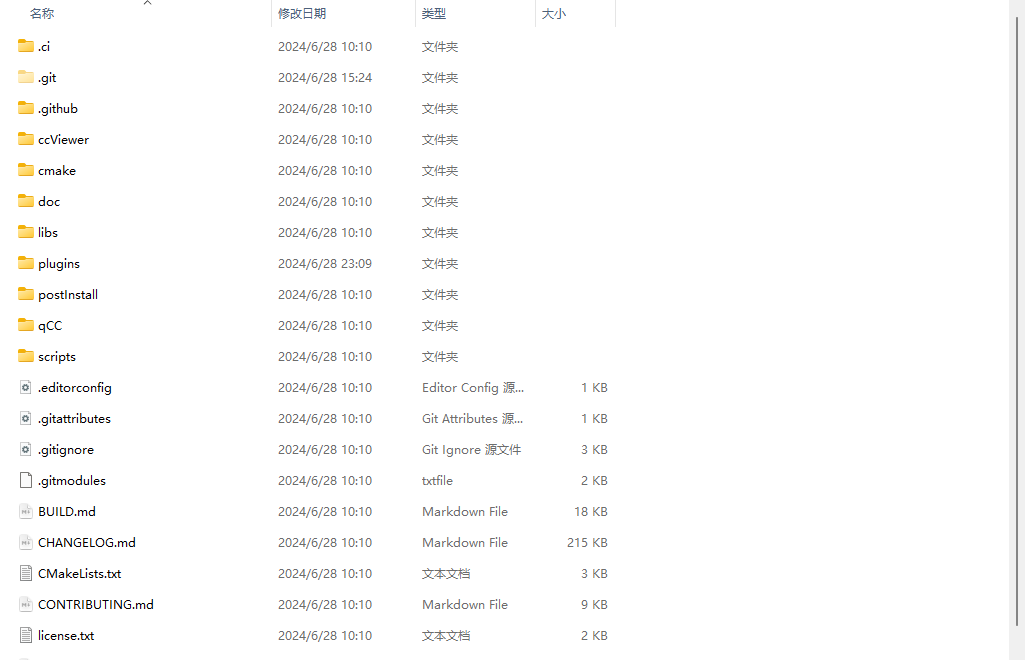
源码下载

1
git clone -b nnu_main_v2.13 https://gitee.com/gisc-github/CloudCompare.git --recursive
  • 注意,仓库内包含索引库,需要加上--recursive
下载的源码目录

插件环境准备

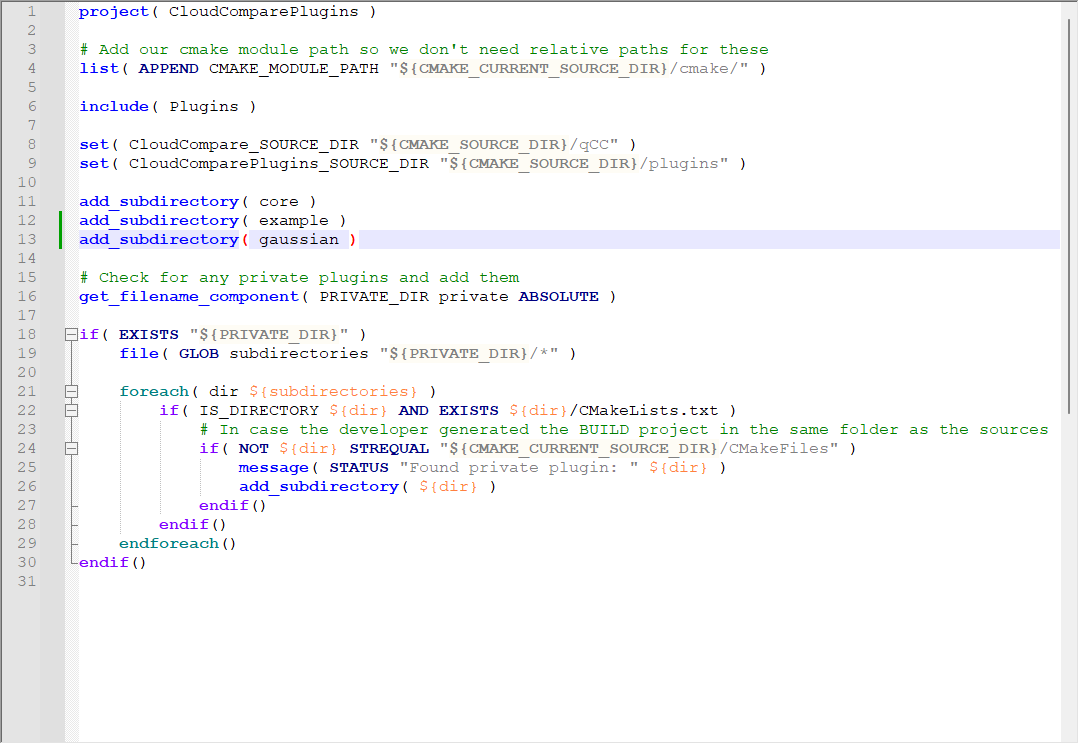
  • 进入CloudCompare\plugins文件夹

    • 复制example文件夹,重命名为gaussian
    • 修改当前目录下的CmakeLists.txt,在第13行添加
      • add_subdirectory( gaussian),提示 Cmake 编译gaussian文件夹下源码
    • 注意目录层级关系和修改的是哪个文件
    plugins文件夹下Cmakelist.txt
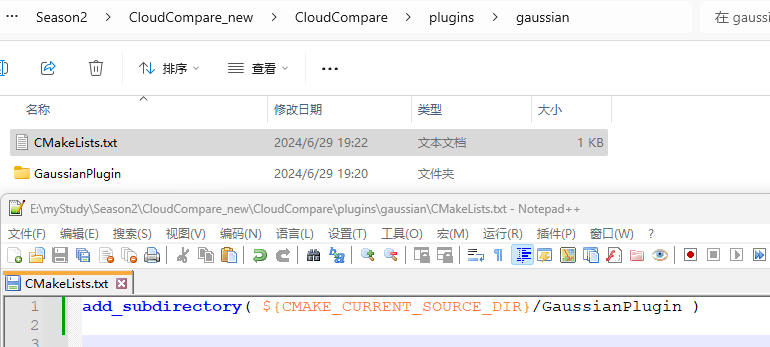
  • 进入gaussian文件夹,修改ExamplePluginGaussianPlugin

    • 修改当前目录下的CmakeLists.txt,修改ExamplePluginGaussianPlugin

    • 注意目录层级关系和修改的是哪个文件

    gaussians文件夹下Cmakelists.txt
  • 进入GaussianPlugin文件夹

    • 修改所有的ExamplePluginGaussianPlugin
    • 源码include文件夹和src.h.cpp中最好也要修改
    • tips:
      • 所有文件都用Notepad++打开,进行批量关键词替换。

cmake编译

  • 打开Cmake软件,填写源码目录和源码编译结果目录

    • Where is the source code: 源码目录
    • Where to build the binaries: 源码编译结果目录(编译完成的sln项目文件目录)
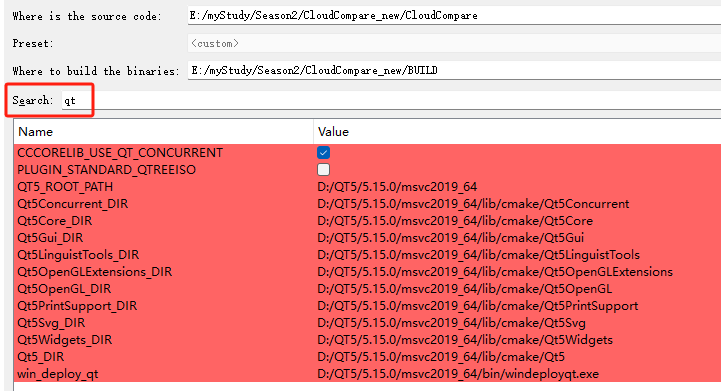
  • 填写qt依赖路径

    • search中搜索qt

    • 将所有路径填写为当前Qt5.15.0的安装路径

    Cmake GUI QT路径设置
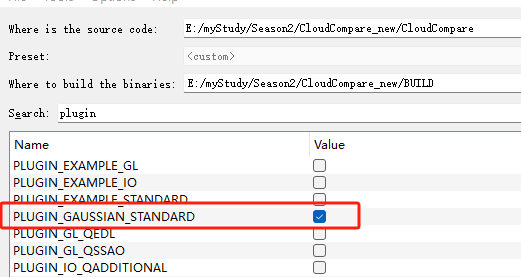
  • 勾选刚刚编辑的插件

Cmake GUI Gaussian插件编译勾选
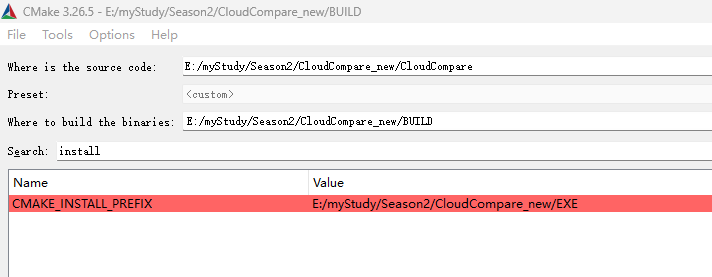
  • 填写项目可执行文件编译路径

    • search中搜搜索install

    • value中指定.exe结果路径

可执行文件编译目的地
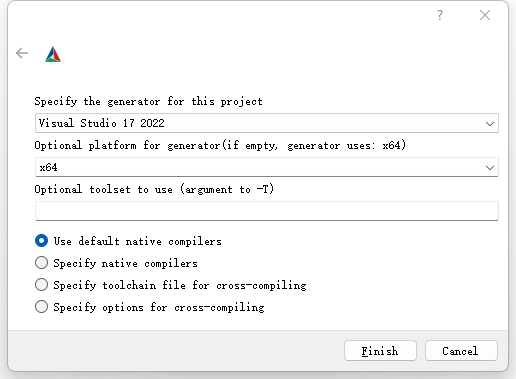
  • 点击Configure配置项目
configure项目
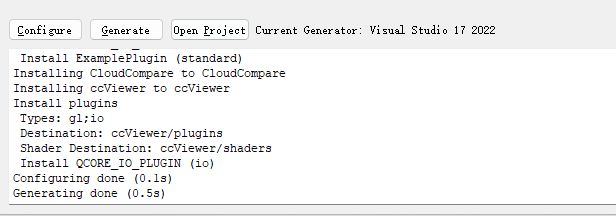
  • 配置成功后点击Generate,在BUILD文件夹下生成项目编译源码
generate项目
  • 小结

    • CloudCompare 为 git 下载的源码
    • BUILD 为 Cmake GUI 从源码中编译出的 .sln 文件
    • EXE 为 BUILD 文件夹中 .sln文件中 install 项目安装的可执行文件
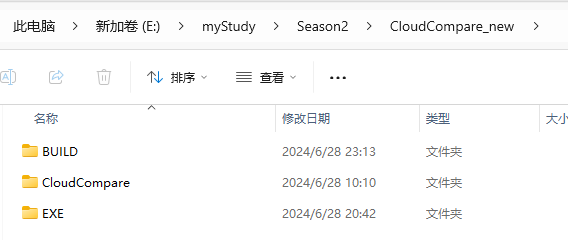
    项目整体目录
    • 操作顺序
      • 编写插件源码
      • 先用Cmake从CloudCompare文件夹中编译源码,期间需要指定源码编译路径和最终exe路径
      • 从源码编译路径中运行sln文件项目
      • 在sln项目中编译项目,在最终exe路径下生成CloudCompare.exe可执行文件

功能代码

GaussianPlugin.h

  • 定义Plugin的功能和作用函数
1
2
3
4
5
6
7
8
9
10
11
12
13
14
15
16
17
18
19
20
21
22
23
24
25
26
27
28
29
30
31
32
33
34
35
36
37
38
39
40
41
42
43
44
45
46
47
48
49
50
51
52
53
54
55
56
57
58
59
60
61
62
63
64
65
//##########################################################################
//# #
//# CLOUDCOMPARE PLUGIN: ExamplePlugin #
//# #
//# This program is free software; you can redistribute it and/or modify #
//# it under the terms of the GNU General Public License as published by #
//# the Free Software Foundation; version 2 of the License. #
//# #
//# This program is distributed in the hope that it will be useful, #
//# but WITHOUT ANY WARRANTY; without even the implied warranty of #
//# MERCHANTABILITY or FITNESS FOR A PARTICULAR PURPOSE. See the #
//# GNU General Public License for more details. #
//# #
//# COPYRIGHT: XXX #
//# #
//##########################################################################

#pragma once

#include "ccStdPluginInterface.h"

//! Example qCC plugin
/** Replace 'ExamplePlugin' by your own plugin class name throughout and then
check 'ExamplePlugin.cpp' for more directions.

Each plugin requires an info.json file to provide information about itself -
the name, authors, maintainers, icon, etc..

The one method you are required to implement is 'getActions'. This should
return all actions (QAction objects) for the plugin. CloudCompare will
automatically add these with their icons in the plugin toolbar and to the
plugin menu. If your plugin returns several actions, CC will create a
dedicated toolbar and a sub-menu for your plugin. You are responsible for
connecting these actions to methods in your plugin.

Use the ccStdPluginInterface::m_app variable for access to most of the CC
components (database, 3D views, console, etc.) - see the ccMainAppInterface
class in ccMainAppInterface.h.
**/
class GaussianPlugin : public QObject, public ccStdPluginInterface
{
Q_OBJECT
Q_INTERFACES( ccPluginInterface ccStdPluginInterface )

// Replace "Example" by your plugin name (IID should be unique - let's hope your plugin name is unique ;)
// The info.json file provides information about the plugin to the loading system and
// it is displayed in the plugin information dialog.
Q_PLUGIN_METADATA( IID "cccorp.cloudcompare.plugin.Gaussian" FILE "../info.json" )

public:
explicit GaussianPlugin( QObject *parent = nullptr );
~GaussianPlugin() override = default;

// Inherited from ccStdPluginInterface
void onNewSelection( const ccHObject::Container &selectedEntities ) override;
QList<QAction *> getActions() override;

private:
//! Default action
/** You can add as many actions as you want in a plugin.
Each action will correspond to an icon in the dedicated
toolbar and an entry in the plugin menu.
**/
QAction* m_action;
};

GaussianPlugin.cpp

  • 实现头文件中的功能,提供函数调用场所。
1
2
3
4
5
6
7
8
9
10
11
12
13
14
15
16
17
18
19
20
21
22
23
24
25
26
27
28
29
30
31
32
33
34
35
36
37
38
39
40
41
42
43
44
45
46
47
48
49
50
51
52
53
54
55
56
57
58
59
60
61
62
63
64
65
66
67
68
69
70
71
72
73
74
75
76
77
78
79
80
81
82
83
84
85
86
87
88
89
90
91
92
93
94
95
//##########################################################################
//# #
//# CLOUDCOMPARE PLUGIN: ExamplePlugin #
//# #
//# This program is free software; you can redistribute it and/or modify #
//# it under the terms of the GNU General Public License as published by #
//# the Free Software Foundation; version 2 of the License. #
//# #
//# This program is distributed in the hope that it will be useful, #
//# but WITHOUT ANY WARRANTY; without even the implied warranty of #
//# MERCHANTABILITY or FITNESS FOR A PARTICULAR PURPOSE. See the #
//# GNU General Public License for more details. #
//# #
//# COPYRIGHT: XXX #
//# #
//##########################################################################

// First:
// Replace all occurrences of 'ExamplePlugin' by your own plugin class name in this file.
// This includes the resource path to info.json in the constructor.

// Second:
// Open ExamplePlugin.qrc, change the "prefix" and the icon filename for your plugin.
// Change the name of the file to <yourPluginName>.qrc

// Third:
// Open the info.json file and fill in the information about the plugin.
// "type" should be one of: "Standard", "GL", or "I/O" (required)
// "name" is the name of the plugin (required)
// "icon" is the Qt resource path to the plugin's icon (from the .qrc file)
// "description" is used as a tootip if the plugin has actions and is displayed in the plugin dialog
// "authors", "maintainers", and "references" show up in the plugin dialog as well

#include <QtGui>

#include "GaussianPlugin.h"

#include "ActionA.h"

// Default constructor:
// - pass the Qt resource path to the info.json file (from <yourPluginName>.qrc file)
// - constructor should mainly be used to initialize actions and other members
GaussianPlugin::GaussianPlugin( QObject *parent )
: QObject( parent )
, ccStdPluginInterface( ":/CC/plugin/GaussianPlugin/info.json" )
, m_action( nullptr )
{
}

// This method should enable or disable your plugin actions
// depending on the currently selected entities ('selectedEntities').
void GaussianPlugin::onNewSelection( const ccHObject::Container &selectedEntities )
{
if ( m_action == nullptr )
{
return;
}

// If you need to check for a specific type of object, you can use the methods
// in ccHObjectCaster.h or loop and check the objects' classIDs like this:
//
// for ( ccHObject *object : selectedEntities )
// {
// if ( object->getClassID() == CC_TYPES::VIEWPORT_2D_OBJECT )
// {
// // ... do something with the viewports
// }
// }

// For example - only enable our action if something is selected.
m_action->setEnabled( !selectedEntities.empty() );
}

// This method returns all the 'actions' your plugin can perform.
// getActions() will be called only once, when plugin is loaded.
QList<QAction *> GaussianPlugin::getActions()
{
// default action (if it has not been already created, this is the moment to do it)
if ( !m_action )
{
// Here we use the default plugin name, description, and icon,
// but each action should have its own.
m_action = new QAction( getName(), this );
m_action->setToolTip( getDescription() );
m_action->setIcon( getIcon() );

// Connect appropriate signal
connect( m_action, &QAction::triggered, this, [this]()
{
Gaussian::performActionA( m_app );
});
}

return { m_action };
}

ActionA.h

  • 定义GaussianPlugin的具体功能函数performActionA
1
2
3
4
5
6
7
8
9
10
11
// Example of a plugin action

#pragma once

class ccMainAppInterface;

namespace Gaussian
{
void performActionA( ccMainAppInterface *appInterface );
}

ActionA.cpp

  • 实现GaussianPlugin的具体功能函数performActionA,为每个点上色
1
2
3
4
5
6
7
8
9
10
11
12
13
14
15
16
17
18
19
20
21
22
23
24
25
26
27
28
29
30
31
32
33
34
35
36
37
38
39
40
41
42
43
44
45
46
47
48
49
50
51
52
53
54
55
56
57
58
59
60
61
62
63
64
65
66
67
68
69
70
71
72
73
74
75
76
77
78
79
80
81
82
83
84
85
86
87
88
89
90
91
92
93
94
95
96
97
98
99
100
101
102
103
104
105
106
107
108
109
110
111
112
113
114
115
// Gaussian Plugin 

#include "ccMainAppInterface.h"

#include "ActionA.h"
#include <ccPointCloud.h>
#include <ccScalarField.h>
#include <ccHObjectCaster.h>

namespace Gaussian
{
void performActionA(ccMainAppInterface* appInterface)
{
// 加载所有f属性,3+15*3
std::vector<QString> requiredAttributes = {
"f_dc_0", "f_dc_1", "f_dc_2"
};
for (int i = 0; i < 45; ++i)
{
requiredAttributes.push_back(QString("f_rest_%1").arg(i));
}


const ccHObject::Container& selectedEntities = appInterface->getSelectedEntities();
if (selectedEntities.empty())
{
appInterface->dispToConsole("No entity selected!", ccMainAppInterface::ERR_CONSOLE_MESSAGE);
return;
}

for (ccHObject* entity : selectedEntities)
{
ccPointCloud* cloud = ccHObjectCaster::ToPointCloud(entity);
if (!cloud)
{
continue;
}

// 检查属性是否存在
bool allAttributesExist = true;
std::vector<int> attributeIndices;
for (const auto& attributeName : requiredAttributes)
{
int sfIdx = cloud->getScalarFieldIndexByName(attributeName.toStdString().c_str());
if (sfIdx < 0)
{
allAttributesExist = false;
break;
}
attributeIndices.push_back(sfIdx);
}

if (!allAttributesExist)
{
appInterface->dispToConsole("One or more required attributes are missing!", ccMainAppInterface::ERR_CONSOLE_MESSAGE);
return;
}


// 创建数组 [N, C, (max_deg+1)**2] 即 [N,3,16]
unsigned pointCount = cloud->size();
const int numGroups = 16;
const int groupSize = 3;
std::vector<std::vector<std::vector<ScalarType>>> SHs(pointCount, std::vector<std::vector<ScalarType>>(groupSize, std::vector<ScalarType>(numGroups, 0)));


for (unsigned i = 0; i < pointCount; ++i)
{
for (int group = 0; group < numGroups; ++group)
{
for (int j = 0; j < groupSize; ++j)
{
ccScalarField* attrField = static_cast<ccScalarField*>(cloud->getScalarField(attributeIndices[group * groupSize + j]));
SHs[i][j][group] = attrField->getValue(i);
}
}
}

// [N, 3, 16] -> [N, 3],实现从 SH -> SH_0
std::vector<std::vector<ScalarType>> plyColor(pointCount, std::vector<ScalarType>(numGroups));

// result = SH_C0 * sh[0];
for (int i = 0; i < pointCount; ++i)
{
for (int group = 0; group < groupSize; ++group)
{
ScalarType SH_0 = SHs[i][group][0]; // sh[0]
plyColor[i][group] = 0.28209479177387814 * SH_0; // SH_C0 * sh[0];
}
}

// 初始化
if (!cloud->hasColors())
if (!cloud->resizeTheRGBTable(false))
return;
// 为每个点分配颜色
for (unsigned int i = 0; i < cloud->size(); ++i) {
if (cloud->getPoint(i)) {
ccColor::Rgb col = ccColor::Rgb(plyColor[i][0] * 255.0 + 128.0, plyColor[i][1] * 255.0 + 128.0, plyColor[i][2] * 255.0 + 128.0);
cloud->setPointColor(i, ccColor::Rgba(col, ccColor::MAX));
}
else {
cloud->setPointColor(i, ccColor::Rgba(ccColor::Rgb(255, 255, 255), ccColor::MAX));
}
}

cloud->showColors(true);
cloud->showSF(false);
cloud->prepareDisplayForRefresh();
}

appInterface->refreshAll();
appInterface->updateUI();
}
}

代码编译

  • 打开BUILD文件夹下.sln文件

  • 点击ALL_BUILD右键编译项目

  • 点击INSTALL右键编译项目

  • 可执行文件编译目的地文件夹下找编译好的CloudCompare.exe


CloudCompare Plugin编写笔记
https://anonymouslosty.ink/2024/06/29/CloudCompare-Plugin编写笔记/
作者
Ling yi
发布于
2024年6月29日
更新于
2024年6月29日
许可协议